
TL;DR:
- Interactive projectors turn surfaces into touch-enabled digital whiteboards for real-time collaboration.
- They are effective in bright Malaysian environments due to high lumens and ambient light handling.
- Success relies on user training and integrating the technology into existing workflows.
Standard projectors have served their purpose for years, but they were built for a one-way world. They project, you watch, and that's where the conversation ends. Malaysian schools and businesses today operate in a far more collaborative environment, where learners ask questions in real time, teams annotate ideas mid-meeting, and remote participants need to feel present in the room. Interactive projectors were built precisely for this shift. This guide breaks down how they work, which types suit different spaces, and what you need to know before making a purchase decision.
Table of Contents
- What is an interactive projector?
- Key benefits for Malaysian schools and businesses
- Types of interactive projectors: Which fits your needs?
- Practical setup tips: Maximizing your investment
- What most guides miss about interactive projectors in Malaysia
- Explore the top interactive projectors and expert support
- Frequently asked questions
Key Takeaways
| Point | Details |
|---|---|
| Core technology defined | Interactive projectors allow touch and annotation directly on the projected image, boosting engagement. |
| Malaysian adaptation | Models like Epson overcome bright classrooms and offices, making them practical for local conditions. |
| Type matters | Choosing between short-throw, ultra-short-throw, or flat panel types depends on your specific space and budget. |
| Setup essentials | Optimal results rely on proper installation, regular maintenance, and considering room lighting. |
| Transformative impact | The right interactive projector can shift learning and meetings from passive to engaging and collaborative. |
What is an interactive projector?
An interactive projector does more than throw an image on a wall. It turns that projected surface into a touchscreen or digital whiteboard, allowing users to write, draw, click, and interact directly on the screen using a stylus, finger, or even a standard pen in some models.
Here's what separates an interactive projector from a standard one:
- Touch and gesture recognition: Built-in infrared or ultrasonic sensors detect touch input on the projected surface
- Annotation tools: Users can mark up slides, diagrams, or documents in real time without switching devices
- Screen mirroring and wireless connectivity: Most modern units support Wi-Fi and Bluetooth, enabling direct screen sharing from laptops and tablets
- Multi-user input: Some models allow two or more users to interact simultaneously, which is ideal for group problem-solving sessions
- Software integration: Interactive projectors often pair with whiteboard software or learning management systems
For Malaysian educators and business teams, these features address a long-standing frustration. Classrooms and boardrooms frequently deal with bright ambient light from windows or fluorescent lighting. Epson models are popular in Malaysian schools and businesses precisely because they are engineered to handle these bright-room challenges without sacrificing image clarity.
"Epson projectors have become a go-to choice for Malaysian institutions because they combine solid brightness output with user-friendly interactive features, making them practical even in non-ideal lighting conditions."
You can explore Epson interactive projectors Malaysia options that are specifically suited for local classroom and office environments. Pairing good hardware with sound educational technology strategies ensures that the investment delivers real results rather than just novelty.
Key benefits for Malaysian schools and businesses
After understanding the technology, let's explore why interactive projectors are becoming essential in Malaysian workplaces and schools. The advantages are not limited to features on a spec sheet. They play out in how people behave during a lesson or a meeting.
Here are five core benefits that matter most for Malaysian users:
- Real-time interaction: Students and participants respond to questions, solve problems, and annotate directly on the screen. This immediate feedback loop improves retention and keeps attention sharp.
- Flexible use across subjects and departments: One unit can serve a math class in the morning and a sales briefing in the afternoon. The device adapts to content, not the other way around.
- Hybrid classroom and meeting readiness: Many interactive projectors integrate with platforms like Google Meet, Zoom, or Microsoft Teams. Remote participants can follow and contribute to annotations in real time.
- Measurably higher engagement: Active participation during lessons consistently outperforms passive watching when it comes to information recall. Students who interact with content retain it significantly better than those who only observe.
- Easier collaboration between teams: Colleagues can co-annotate, move content around, and share their own screens without needing a dedicated IT person in the room.
Malaysia's climate adds a specific challenge worth calling out. Classrooms and offices often run under bright fluorescent lights and have large windows that introduce glare. Epson models are widely adopted even in spaces with high ambient light because they offer high lumen ratings (often 3,000 to 4,100 lumens) that keep images visible and vibrant under these conditions.
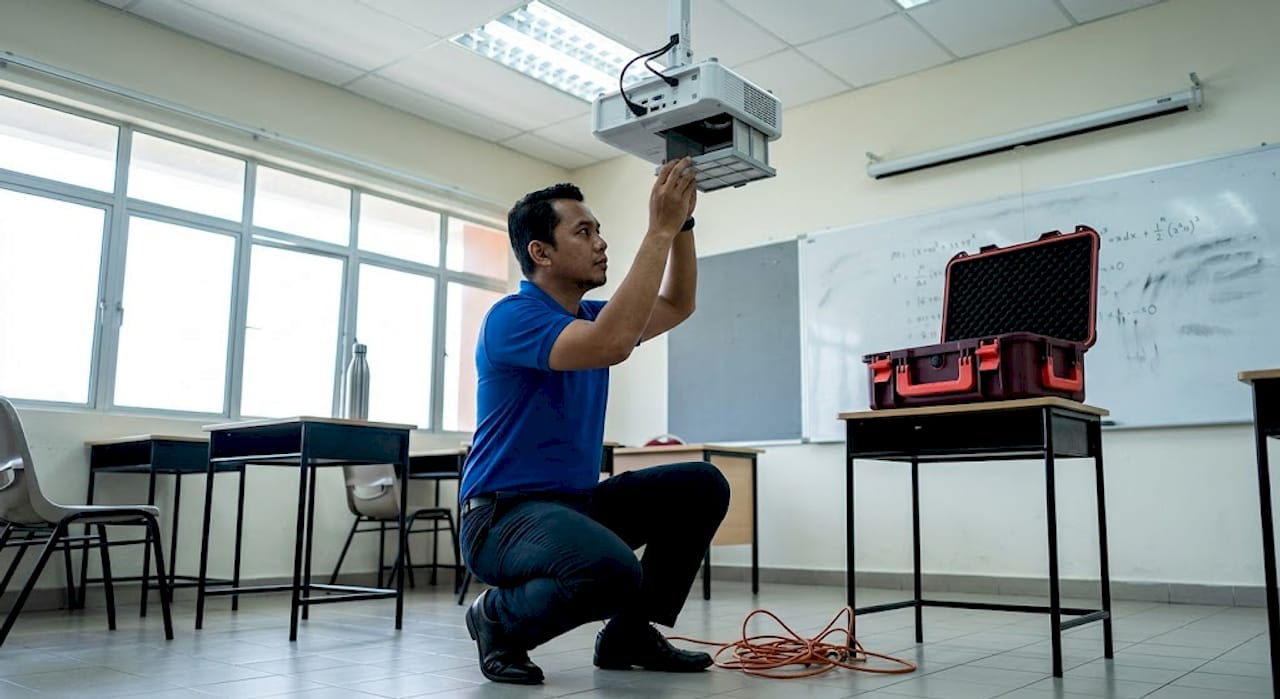
You can read more about selecting the right Epson projectors in Malaysia based on your room's specific lighting and size requirements.
Pro Tip: If your space gets a lot of natural light, position the projector so the beam faces away from windows. Even a small adjustment in angle can reduce washout significantly, especially during midday hours common in Malaysia's equatorial climate.
Types of interactive projectors: Which fits your needs?
Knowing the benefits, it's vital to match the right type of interactive projector to your space and requirements. There are three main categories worth understanding before you commit to a purchase.
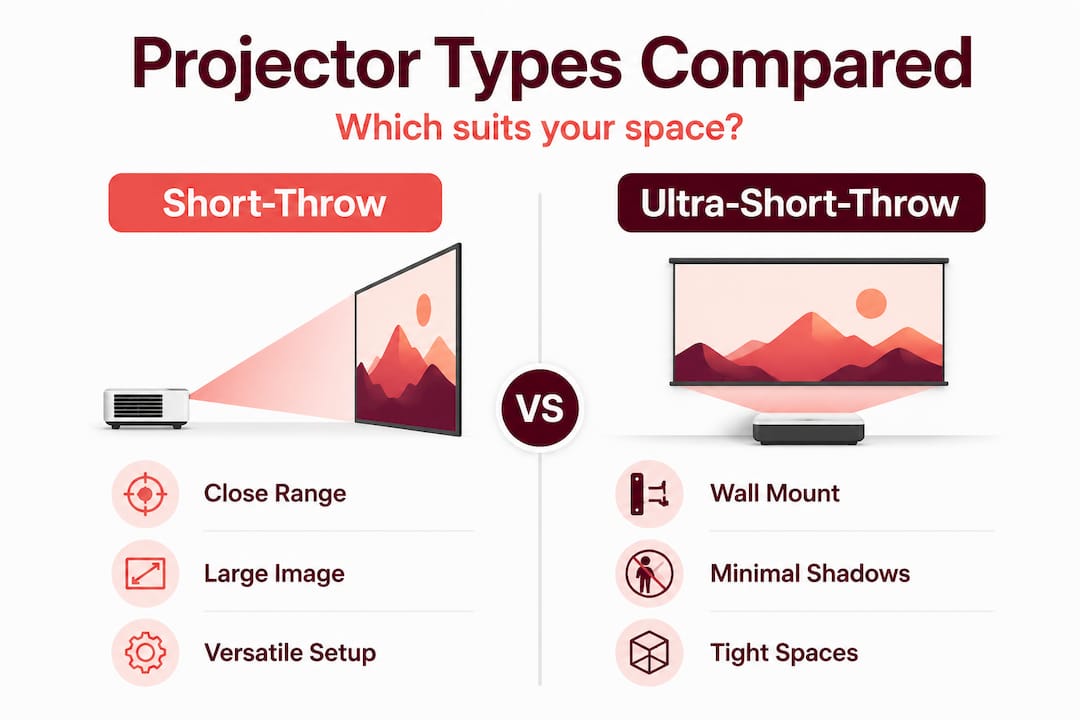
Short-throw projectors are designed to project large images from a relatively close distance, typically 1 to 1.5 meters from the screen. They work well in standard-sized classrooms and meeting rooms where ceiling mounting is possible but floor space is limited.
Ultra-short-throw (UST) projectors sit just centimeters from the projection surface, often mounted directly below the screen or on a desk. They eliminate shadow interference completely, which is one of the most common complaints teachers have with traditional setups. Epson's ultra-short-throw models address ambient light challenges through a combination of high brightness and close-range projection that minimizes light scatter.
Interactive flat panels are technically not projectors, but they compete in the same category. They are large all-in-one LCD or LED displays with built-in touch capability. They offer excellent image quality but come at a higher cost and are fixed in size.
Here's a quick feature comparison to guide your choice:
| Type | Ideal room size | Brightness range | Installation flexibility | Approximate price range (MYR) |
|---|---|---|---|---|
| Short-throw projector | Medium (30 to 60 sqm) | 2,500 to 3,500 lumens | High | 3,000 to 8,000 |
| Ultra-short-throw projector | Small to medium | 3,000 to 5,000 lumens | Moderate | 7,000 to 18,000 |
| Interactive flat panel | Small to medium | Screen-dependent | Low (wall-mounted) | 10,000 to 30,000+ |
Key features by type:
- Short-throw: Great value, wide compatibility, works with standard screens
- Ultra-short-throw: No shadows, minimal eye strain, best for interactive use in compact rooms
- Interactive flat panel: Sharpest image, all-in-one, but limited to fixed display size
The Epson EB-760Wi interactive projector is a strong example of an ultra-short-throw model that delivers 4,100 lumens, WXGA resolution, and built-in wireless connectivity. It is one of the most frequently recommended units for Malaysian boardrooms and larger classrooms.
Pro Tip: For compact Malaysian classrooms under 40 square meters, an ultra-short-throw model mounted directly below a whiteboard is often the most effective setup. It keeps the projected area fully interactive without shadows from students walking up to the board.
Practical setup tips: Maximizing your investment
Once you've selected your projector, effective setup and maintenance are key to ensuring lasting performance and user satisfaction. Even the best hardware underperforms when it's poorly installed or inconsistently maintained.
Follow these steps from unboxing to first use:
- Read the mounting requirements first. Every projector has a specific throw ratio. Measure your wall-to-mount distance before drilling or purchasing mounts.
- Calibrate the touch surface. Interactive projectors require a calibration step after installation. Follow the on-screen prompts carefully, as skipping this step leads to inaccurate touch registration.
- Connect to your network. Set up Wi-Fi connectivity before the first class or meeting. Test screen mirroring from at least two different devices.
- Install and update all software. This includes the projector's firmware, the companion whiteboard application, and any driver software needed for your OS.
- Train the primary users. Run a 30-minute session with teachers or presenters before the unit goes live. Familiarity with basic annotation tools dramatically increases adoption.
- Label cables and document the setup. This saves hours of troubleshooting when something disconnects during a session.
Epson models are chosen for their ease of use and adaptability across Malaysian environments, partly because their setup menus are intuitive and their companion apps are available in multiple languages. You can find additional projector installation tips that cover both home and business settings in detail.
Here is a recommended maintenance schedule to keep your projector performing reliably:
| Maintenance task | Recommended frequency |
|---|---|
| Clean the lens with a soft cloth | Monthly |
| Check and clean air filters | Every 3 months |
| Inspect mounting brackets and cables | Every 6 months |
| Run firmware updates | As released |
| Full system recalibration check | Annually or after relocation |
| Review lamp or laser usage hours | Every 6 months |
Malaysia's humidity is a real factor. Dust accumulates faster in tropical climates, and clogged filters cause projectors to overheat and fail prematurely.
Pro Tip: Store a small, dry microfiber cloth near the projector at all times. A quick lens wipe before each session costs nothing and prevents image degradation that builds up unnoticed over weeks of classroom use.
Common mistakes to avoid include placing the projector too close or too far from the screen without checking the throw ratio, skipping firmware updates, and ignoring the calibration step after moving the unit to a different room. These small errors consistently cause big frustrations during live presentations.
What most guides miss about interactive projectors in Malaysia
Most buying guides stop at the specs. They compare lumens, resolution, and price, then leave you to figure out the rest. But after seeing how these devices actually get used in Malaysian schools and corporate training rooms, the most important variable is almost never on the product page.
It's the people.
A school that buys an ultra-short-throw projector and hands it to a teacher who has never used annotation software will get roughly the same results as a school that bought nothing. The hardware is just a surface. What transforms outcomes is how confidently and creatively the user engages with that surface.
Malaysian organizations that get the most from projector planning tips tend to share one trait: they treat the projector as a gateway, not a destination. They pair it with collaborative platforms, digital lesson plans, and ongoing training sessions for staff. The projector becomes part of a workflow rather than an isolated gadget that gets used once and forgotten.
There's also a cultural dimension worth acknowledging. Malaysian classrooms often have large class sizes and a traditionally teacher-led dynamic. Interactive projectors genuinely shift that balance, but only when educators feel empowered to facilitate rather than lecture. The best technology cannot force a change in pedagogy. It can only make the transition easier when the educator is ready.
The businesses seeing the strongest returns are those using interactive projectors as part of a broader collaborative culture, not as a showpiece in the boardroom. They integrate it with their existing CRM dashboards, project management tools, and video conferencing setup. That's when the technology stops being impressive and starts being indispensable.
If you are evaluating interactive projectors for your organization, ask this before asking about specs: "Do our people have the confidence and training to use this every day?" That answer will determine your ROI far more than the resolution.
Explore the top interactive projectors and expert support
If you're ready to put these insights into action or explore interactive options tailored for Malaysia, here's where to start.
At ProjectorDisplay.com, we carry a carefully selected range of interactive projectors suited for Malaysian classrooms, boardrooms, and training facilities. From trusted brands to cutting-edge laser models, our catalog covers every room size and budget.

Browse our current projector deals for seasonal promotions on top-performing units, or go straight to the Epson EB-760Wi if you are already set on a high-lumen ultra-short-throw solution. We also offer a full range of projector screens and mounting accessories to complete your setup. Contact us via WhatsApp for personalized recommendations and fast shipping throughout Peninsular Malaysia.
Frequently asked questions
What are the main features to look for in an interactive projector?
Key features include multi-touch support, wireless connectivity, annotation capabilities, and device compatibility. Epson models include user-friendly interactive features that are especially well suited to Malaysian school and business environments.
Can interactive projectors work well in bright Malaysian classrooms?
Yes, models with high brightness ratings of 3,000 lumens or more perform effectively even under the bright ambient light typical of Malaysian schools. Epson models are used widely across Malaysia despite these lighting challenges.
Are interactive projectors hard to install and maintain?
Modern models are designed for straightforward installation and simple ongoing maintenance. Epson models are chosen for their adaptability and ease of use, and following a regular maintenance schedule keeps them performing reliably for years.
How do interactive projectors compare to smart displays?
Interactive projectors offer greater flexibility across different room sizes and can project much larger images than a fixed display. Smart displays, on the other hand, provide an all-in-one digital whiteboard solution with no setup required, but they are limited to a fixed screen size and typically cost significantly more for comparable display area.
Recommended
- Why use projectors in education: boost learning outcomes – Projector Display
- Best projectors for remote learning in Malaysian classrooms – Projector Display
- Improving Student Engagement: Strategies for Modern Classrooms – Projector Display
- Gamification in Learning: Transforming Classroom Engagement – Projector Display
- Digital Innovation Projects – Product Portfolio | Format 3
- Minecraft Education: The 2026 Guide for… | Gaia Legends