
TL;DR:
- Independent measurements reveal real-world projector performance often differs from manufacturer specs.
- Room lighting, placement, and screen type critically influence perceived brightness and contrast.
- Proper room assessment and flexible installation are key to long-term satisfaction with laser projectors.
Buying a laser projector based on the manufacturer's spec sheet alone is one of the most reliable ways to end up disappointed. The number on the box rarely tells you how the projector will actually perform in your living room, your boardroom, or your open-plan office space. Real-world brightness, room lighting, throw distance, and the interaction between contrast and ambient light all shape what you actually see on screen. This guide cuts through the marketing noise to give you a practical, evidence-based overview of laser projectors, grounded in third-party test data and Malaysian-specific installation realities.
Table of Contents
- What makes a laser projector different?
- Key considerations: brightness, contrast, and real-world performance
- Ultra-short throw vs standard throw: placement and installation impacts
- Edge cases, trade-offs, and buying pitfalls
- What most Malaysian buyers miss about laser projectors
- Shop and plan your ideal laser projector setup
- Frequently asked questions
Key Takeaways
| Point | Details |
|---|---|
| Specs don't tell the whole story | Always verify with measured brightness and independent reviews, not just marketing numbers. |
| Room and use case matter most | Choose your projector based on your space, ambient light, and viewing needs for best results. |
| Placement affects everything | Decide between ultra-short throw and standard throw based on your room setup and installation options. |
| Watch for edge cases | Understand potential pitfalls like contrast shortfalls, rainbow effects, and gaming mode quirks before buying. |
| Local support and guidance help | Use Malaysian-specific guides and resources for expert tips relevant to your environment. |
What makes a laser projector different?
A laser projector uses a laser light source instead of a traditional high-pressure mercury lamp or LED array. That distinction sounds simple, but it has significant downstream effects on brightness consistency, color accuracy, and how long the unit lasts before performance degrades. Lamp-based projectors typically need bulb replacements every 2,000 to 5,000 hours. Laser projectors, by contrast, can maintain usable output for 20,000 hours or more, which matters a lot if you are running presentations daily or watching movies every evening.
Compared to LED vs laser projector alternatives, laser models generally win on peak brightness. LED projectors offer excellent color saturation and long life, but they struggle to hit the high lumen counts that laser sources can achieve with ease. That gap becomes very visible in bright Malaysian living rooms where natural light floods in through large windows.
Key benefits of laser projectors include:
- Consistent brightness over the unit's lifespan, without the gradual dimming that lamp models experience
- Wide color gamut, especially in RGB triple-laser designs that cover a much broader spectrum than lamp or single-phosphor laser models
- Instant on/off, without warm-up or cool-down cycles
- Low maintenance, since there is no lamp to replace on a regular schedule
- Stable image quality across varied ambient temperatures, which suits Malaysia's climate
One of the most persistent misconceptions is that "laser always means brighter." That is simply not true. Measured ANSI lumens can land above or below the manufacturer's stated rating. Independent testing of the Hisense L9Q found a measured output of 5,185 ANSI lumens in its brightest mode against a 5,000 ANSI-lumen specification, so that unit actually over-delivered. But the Optoma UHZ68, rated at 4,500 ISO lumens, measured just 3,627 ANSI lumens in independent testing, roughly 19.4% below spec. That difference sits within the allowable ISO 21118 industry tolerance, but it is still a meaningful gap when you are planning a home theater setup around brightness targets.
Pro Tip: Always search for independent measurements of any projector model you are considering. Manufacturer specs are marketing tools. Third-party benchmark results from credible reviewer sites give you a far more reliable picture of what will actually land on your screen.
Key considerations: brightness, contrast, and real-world performance
Knowing the technical differences is just step one. Translating specs into real-world results is where most buyers struggle next.
Brightness and contrast do not operate in isolation. The way they interact with your room environment determines how satisfying your image actually looks. In Malaysia, most homes and small business spaces are not purpose-built home theaters. Ambient light from windows, overhead lighting, and even reflected wall colors all reduce perceived contrast and wash out shadow detail.
The 2025 UST Projector Showdown found that buyers often favor higher brightness combined with solid black floor performance for mixed-lighting environments, rather than chasing the absolute best native black level. In other words, a projector with slightly elevated black levels but strong brightness can look more impressive in a real-world living room than a unit with extraordinary native contrast but modest output.
"The most important buying nuance in a home theater or UST decision is often the interaction between brightness, room ambient light, and black level rather than the laser vs lamp debate alone." This is a lesson experienced reviewers have reinforced repeatedly, and it is one that most spec sheets completely ignore.
The Optoma UHZ68 review highlights that in environments without full light control, higher measured brightness and consistent dynamic tone mapping often matter as much as or more than native contrast claims. This is particularly relevant for Malaysian small business owners who want to run presentations in a meeting room that doubles as a client reception space.
Follow these steps to match projector brightness to your actual use case:
- Assess your room lighting. Count the windows, note when direct sunlight enters, and check whether you can use blackout blinds or curtains.
- Measure your intended screen size. Larger screens spread the same lumens over more area, reducing perceived brightness proportionally.
- Set a minimum lumen target. For rooms with controlled lighting, 2,000 to 3,000 ANSI lumens is often enough. Bright ambient environments may require 4,000 or more.
- Factor in screen gain. A high-gain screen reflects more light toward the viewer, partially compensating for lower-brightness projectors.
- Validate with independent reviews. Use measured lumen data, not rated specs, when comparing models.
Our home projector buying guide walks through these steps in greater detail, and the broader Malaysia projector buying guide addresses room-specific considerations that apply directly to local homes and offices.
Ultra-short throw vs standard throw: placement and installation impacts
The relationship between brightness and your environment is crucial, but how you physically position the projector introduces a completely different set of factors.
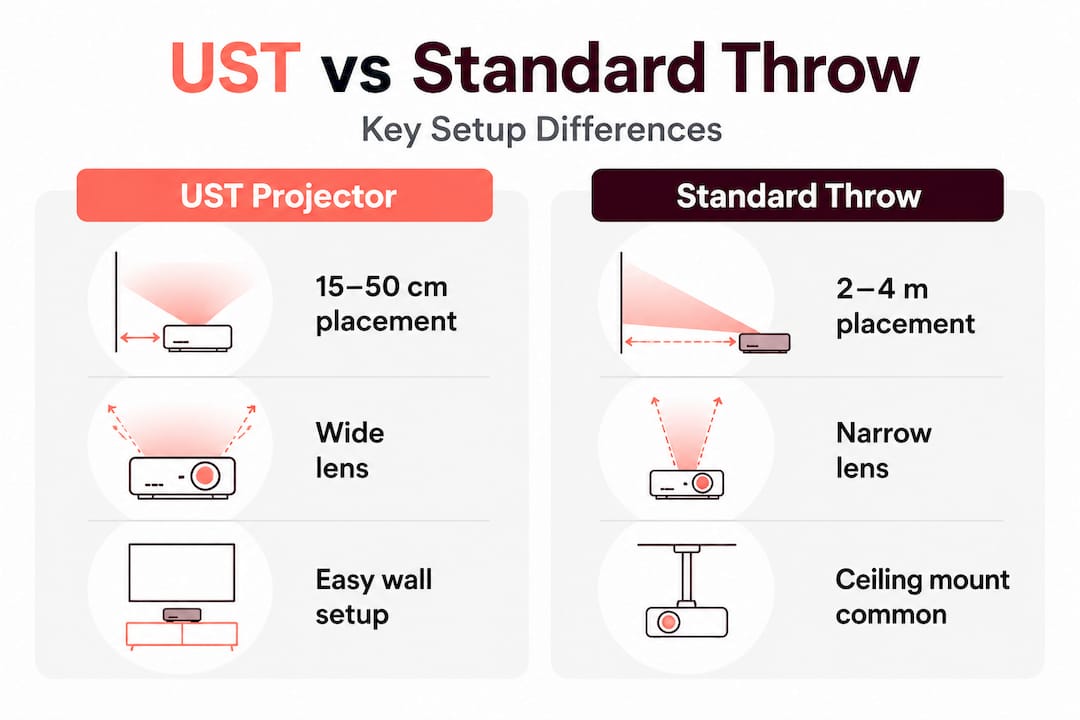
Ultra-short throw (UST) projectors sit very close to the screen or wall, typically within 15 to 50 cm, using a wide-angle lens to fill a large image from a short distance. Standard throw projectors need to sit much further back, usually 2 to 5 meters or more depending on the screen size. Both categories have real advantages and genuine limitations.
| Feature | Ultra-short throw (UST) | Standard throw |
|---|---|---|
| Placement distance | 15 to 50 cm from screen | 2 to 5+ meters from screen |
| Shadow interference | Minimal | More likely with wall-mounted units |
| Room depth required | Small | Larger |
| Ceiling mounting | Rarely needed | Common |
| Lens/keystone options | Usually automated | Manual or motorized |
| Price range | Higher for equivalent specs | Broader range available |
| Wiring complexity | Simpler (unit near wall) | Longer cable runs needed |
The Epson Lifestudio Grand Plus is a strong example of a UST unit with very short throw distance and built-in lens automation. The Hisense L9Q adds RGB triple-laser optics with optical calibration. On the standard throw side, models like the Optoma UHC70LV provide lens shift and flexible installation options that suit rooms where the projector cannot be placed directly in front of the screen.
Installation considerations to keep in mind before you buy:
- Wall clearance: UST projectors need a clean, flat surface directly behind them. Any wall art or vents in that zone create problems.
- Ceiling height: Standard throw projectors mounted overhead need enough ceiling height to achieve the correct throw angle without extreme keystone correction.
- Cable routing: In Malaysian apartments and shophouses, routing HDMI, power, and audio cables invisibly often takes more planning than the projector itself.
- Screen compatibility: UST projectors ideally need a flat, rigid ALR (Ambient Light Rejecting) screen. Rolling fabric screens often create hotspots or waviness at close range.
- Furniture placement: A UST unit on a TV console below the screen works beautifully but cannot be used if you want a coffee table in the same spot.
Pro Tip: Before choosing between UST and standard throw, draw a simple floor plan of your room and mark where your seating, screen, and projector would actually go. Many buyers discover their "ideal" projector category does not fit their actual space once they do this exercise. Our short throw vs long throw guide includes throw distance calculators to make this easier.
Edge cases, trade-offs, and buying pitfalls
After addressing placement, you will want to anticipate the quirks and trade-offs that real users encounter, especially if you are picky about image quality or plan to use your projector for gaming.
Single-chip DLP laser projectors, which use a color wheel or sequential color processing, can produce a rainbow effect (also called RBE, or rainbow effect artifact) in high-contrast scenes. Expert reviewers note that the Hisense L9Q shows a mild rainbow effect in highlights and subtitle text due to its single-chip DLP design. The Optoma UHZ68 also exhibits RBE along with menu and mode quirks, specifically that certain settings change when you activate the low-latency gaming mode. These are not dealbreakers for most users, but they matter a great deal if you are sensitive to this artifact or if gaming is a primary use case.
| Model | Rated brightness | Measured brightness | Key quirk |
|---|---|---|---|
| Hisense L9Q | 5,000 ANSI lm | 5,185 ANSI lm | Mild RBE in highlights |
| Optoma UHZ68 | 4,500 ISO lm | 3,627 ANSI lm | RBE + mode-dependent setting changes |
| Hisense PT1 | Specified | Strong uniformity | Contrast lower than higher-output rivals |
A noteworthy pattern in independent testing is that a significant proportion of projectors measure below their rated brightness when tested under standardized conditions. That gap can range from a few percent to nearly 20%, all within industry-allowed tolerances. The practical implication: always build a buffer into your brightness target when shopping.
The top buying pitfalls for Malaysian buyers include:
- Relying on default picture modes: Factory settings often boost brightness at the cost of color accuracy. Calibrated modes look better but may seem dimmer out of the box. Test in the mode you will actually use.
- Ignoring input lag for gaming: A projector rated at 4K HDR with beautiful color may have 80ms or more of input lag in its standard mode, making fast games unplayable. Always check the low-latency mode measurement separately.
- Assuming any screen works: Pairing a UST projector with a non-ALR screen in a bright room destroys much of the brightness advantage. Screen choice is as important as projector choice.
- Overlooking 3D requirements: If 3D projection is on your list, check whether the model supports DLP-Link or IR sync and whether you need to buy glasses separately.
- Ignoring local warranty and support: A projector bought from an unauthorized gray-market source may lack local warranty coverage, which is a real problem if a laser module fails after 18 months.
A quick final checklist before you commit: confirm measured lumens from an independent review, verify input lag in gaming mode, check the throw ratio against your room dimensions, and ask whether the seller provides local after-sales support in Malaysia.
What most Malaysian buyers miss about laser projectors
Here is the uncomfortable truth we have observed after helping hundreds of Malaysian buyers through the selection process. Most people start with a spec and then try to fit their room around it. The buyers who end up genuinely happy almost always do the opposite. They start with their room, map out where the projector can realistically go, note how much ambient light they are working with, and then filter projectors to match those constraints.
Headline specifications are marketing tools. They are calibrated to win comparison charts, not to tell you how a projector will perform in a room with afternoon sunlight coming through a sliding glass door in a Petaling Jaya condo. Independent testing regularly reveals that measured performance differs from rated specs, sometimes favorably, sometimes not, and the only way to know is to look beyond the brochure.
"In our experience, the buyer who maps projector placement before picking a spec is always happier. The buyer who picks a spec first and then tries to adapt their room is the one who ends up returning the unit."
Installation flexibility consistently outperforms spec-maxing as a predictor of long-term satisfaction. A projector with slightly lower peak brightness but excellent lens shift, keystone correction, and a forgiving throw ratio will serve you far better in a real Malaysian home or office than a theoretical powerhouse that requires precise alignment in a room you cannot fully darken.
Pro Tip: Before finalizing any purchase, look for local dealers who offer demonstration units or showroom viewings. Failing that, check for credible third-party review measurements and compare those against your room's specific requirements. No amount of spec-reading replaces seeing the image in a representative environment. Our home cinema expert comparison page includes curated options tested against real-world Malaysian conditions.
The right questions to ask are not "Which projector has the highest lumens?" or "Which model has the best contrast ratio?" The right questions are "Will this projector work well in my specific space?" and "How will I actually use this most of the time?" Those two questions, answered honestly, will lead you to a better decision every single time.
Shop and plan your ideal laser projector setup
Ready to take what you have learned and move toward an outstanding viewing experience? ProjectorDisplay.com offers Malaysia's most focused selection of laser projectors, projection screens, and accessories, all curated for local homes, offices, and classrooms.

Whether you are building a dedicated home theater, upgrading a meeting room, or simply want a cinema-quality image in your living space, our team can help you match the right unit to your room and budget. Explore our full breakdown of laser projector advantages to understand which features matter most for your use case, and use our detailed throw distance guide to confirm the right projector category for your space before you buy. Reach us on WhatsApp for fast, personalized advice and enjoy secure checkout with fast shipping across Peninsular Malaysia.
Frequently asked questions
How do I know how bright my laser projector should be?
Match brightness in ANSI lumens to your room lighting conditions and screen size. For Malaysian spaces with significant ambient light, prioritize measured brightness alongside contrast performance rather than treating either figure in isolation.
Why do measured projector specs differ from the manufacturer ratings?
Independent tests often find actual brightness below claimed specs due to standardized testing conditions and allowable industry tolerances. The Hisense L9Q measured above its spec while the Optoma UHZ68 measured nearly 20% below, both within acceptable industry range.
What is the rainbow effect and does it affect all laser projectors?
Rainbow effect is a visual fringing artifact common in single-chip DLP projectors where sequential color processing creates brief color flashes in high-contrast scenes. It is not present in every laser projector, particularly not in three-chip or RGB laser designs, so sensitive users should confirm DLP chip architecture in reviews before buying.
Are ultra-short throw (UST) projectors easier to set up than standard throw?
UST projectors simplify placement by sitting close to the wall and eliminating the need for ceiling mounts, but they require careful screen surface alignment and ideally a purpose-made ALR screen. The Epson Lifestudio Grand Plus illustrates how automated lens calibration can ease this process significantly.
What projector features are most important for gaming or presentations?
Low input lag in a dedicated game or fast mode, consistent measured brightness, and predictable color behavior across modes are the most critical factors. Always verify that low-latency modes do not introduce unintended changes to other picture settings before committing to a gaming-focused purchase.
Recommended
- LED vs Laser Projector: Which Is Best for You in Malaysia? – Projector Display
- Projector FAQ Malaysia: Your Complete Guide to Smart Buying – Projector Display
- Home projector buying guide 2026: expert tips for Malaysians – Projector Display
- Malaysia Projector Buying Guide: Features, Tips & Choices – Projector Display
- Why compare tech retailers in Singapore for smart shopping – Sim Lim Square Insider