

TL;DR:
- USB-C Power Delivery provides a stable power source for portable projectors, requiring fixed 15V or 20V profiles for reliability. Proper cables with E-marker chips and power banks supporting fixed-voltage profiles are essential to avoid flickering and shutdowns. Confirming compatibility in manuals prevents common self-inflicted issues and ensures off-grid performance.
USB-C Power Delivery (PD) is the standardized protocol that lets projectors receive stable, sufficient power through a single USB-C cable, replacing the traditional AC adapter in portable setups. Understanding projector USB power delivery is critical for professionals and tech-savvy users who want reliable off-grid performance from brands like BenQ, XGIMI, and Anker Nebula. Get the specs wrong and your projector flickers, resets, or simply refuses to turn on. Get them right and you have a genuinely cable-reduced, portable display system that works anywhere.
What power specifications does USB-C PD require for projectors?
Most portable projectors need at least 45W input via USB-C PD, with 65W recommended for reliable operation under heavy load. That 20W gap matters more than it sounds. Running a projector at 45W when it needs 65W causes thermal throttling, brightness drops, and unexpected shutdowns.
The voltage profiles required are specific. Projectors need fixed 15V/3A or 20V/2.25A output from the power source. These are not interchangeable with the Programmable Power Supply (PPS) profiles common in smartphone chargers. PPS negotiates voltage dynamically, which works well for phones but causes instability in projectors that demand a locked, steady voltage rail.
Key power requirements to verify before buying any power source:
- Minimum wattage: 45W input; 65W preferred for sustained use
- Fixed voltage profiles: 15V/3A or 20V/2.25A, not variable PPS
- Connector type: USB-C with full PD negotiation support
- Projector manual check: Always confirm the exact voltage requirement in the manufacturer spec sheet
Pro Tip: Prioritize power banks that explicitly list fixed-voltage PD output profiles on their spec sheet. A bank advertising "65W USB-C" may still use PPS negotiation, which is incompatible with most projectors.
Checking the projector manual takes two minutes and prevents hours of troubleshooting. Brands like BenQ and XGIMI publish detailed USB-C PD compatibility notes in their documentation. Use them.
How do USB-A and USB-C ports differ on projectors?
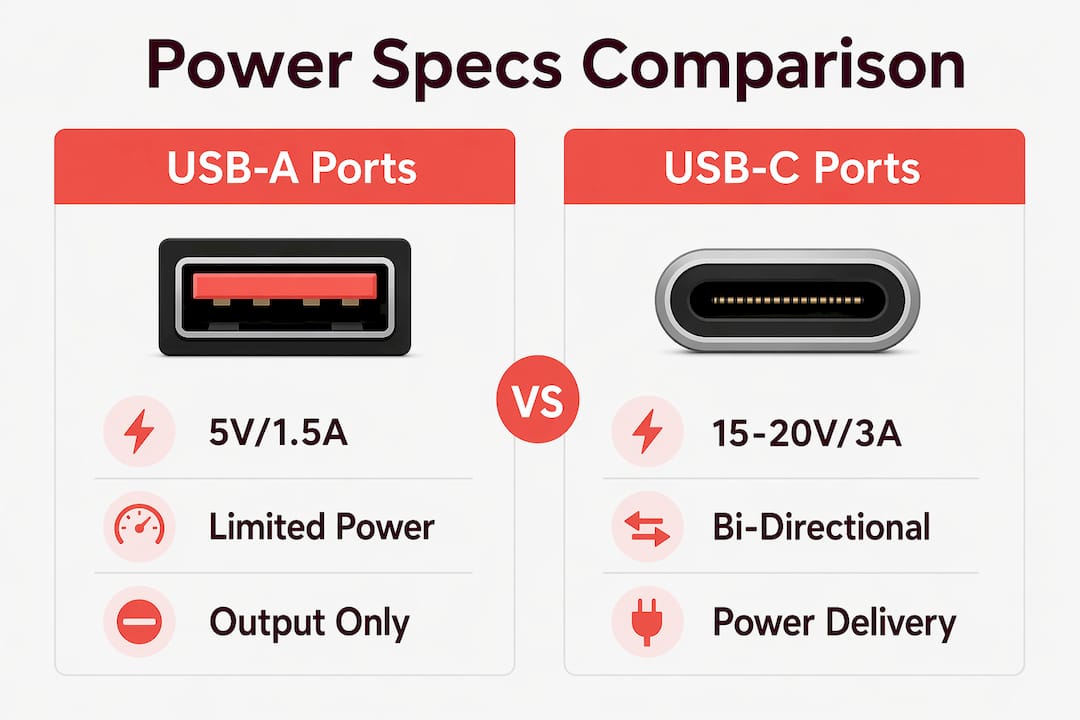
The two port types on a projector serve completely different purposes. USB-A ports are limited to 5V/1.5A output for accessories, meaning they can power a wireless dongle or a small LED light but cannot supply meaningful power input to run the projector itself. Some models include USB-A "service" ports rated at only 5V/1A, which cannot even reliably power high-demand peripherals without causing device resets.
USB-C ports are fundamentally different. They may support bi-directional power flow, meaning the projector can receive power through USB-C while also outputting power to charge a connected device. Whether a specific model supports this depends entirely on the firmware and hardware implementation. Functionality varies significantly by model, and the only reliable way to confirm is to consult the product manual.
| Feature | USB-A Port | USB-C Port |
|---|---|---|
| Power output | 5V/1A or 5V/1.5A | Up to 20V/3A (model dependent) |
| Power input | Not supported | Supported on compatible models |
| Video signal | Not supported | DisplayPort Alt-Mode (model dependent) |
| Peripheral use | Dongles, drives, small devices | Streaming sticks, charging devices |
| PD negotiation | No | Yes, on PD-enabled ports |
DisplayPort Alt-Mode over USB-C is another variable. Cable quality and E-marker chips determine whether a USB-C cable can carry both power and video simultaneously. Power delivery over USB-C ranges from 60W to 240W depending on cable specifications. A cheap cable without an E-marker chip will cap power transfer and may drop the video signal entirely.
Practical implications for your setup:
- Use USB-A ports only for low-draw accessories like Anycast dongles or USB drives
- Confirm USB-C PD input support in the projector spec sheet before purchasing a power bank
- Use a certified, E-marker-equipped USB-C cable for any setup combining power and video
What are the best practices for choosing a power bank for USB PD projectors?
Matching the power bank to the projector is not optional. Power banks deliver roughly 80–85% of their rated watt-hours due to internal efficiency losses. A 100Wh power bank realistically delivers 80–85Wh to the projector. Plan your runtime around that number, not the label.
Follow this process when selecting a power bank:
- Confirm the projector's fixed voltage requirement. Check the manual for 15V or 20V fixed PD output. Do not assume.
- Reject PPS-only power banks. PPS profiles cause instability in projectors needing fixed voltage, leading to flickering and shutdowns. Verify the bank explicitly supports fixed-voltage PD.
- Calculate real capacity. Multiply rated watt-hours by 0.80 to get usable output. For a 65W projector, a 100Wh bank gives roughly 74 minutes of runtime after losses.
- Check the output wattage ceiling. A bank rated at 45W maximum cannot sustain a projector that peaks at 65W. Buy headroom.
- Inspect the USB-C cable. Use a cable with an E-marker chip for any connection above 60W. A standard cable will throttle power delivery and may damage equipment over time.
- Test before going off-grid. Run the full setup at home for 30 minutes. Verify stable brightness, no flickering, and accurate runtime before relying on it outdoors.
Pro Tip: Test your power bank and projector combination indoors before any outdoor event or presentation. Runtime surprises at a campsite or client meeting are avoidable with a 30-minute home test.
Brands like Anker and Baseus publish fixed-voltage PD output specs clearly. If a power bank's spec sheet does not list fixed-voltage profiles, treat it as incompatible until confirmed otherwise. For deeper guidance on optimizing projector battery life, Projectordisplay covers capacity planning and inverter efficiency in detail.
How does USB power delivery change projector portability?
USB-C PD eliminates the need for a bulky AC adapter and a separate inverter, which is the single biggest practical advantage for portable projector users. A projector, a power bank, and a single USB-C cable replace what used to require a power strip and a 300W inverter. That reduction in weight and cable count is significant for camping, road trips, and mobile presentations.
LED projectors consume between 50W and 100W, and standby phantom drain can waste roughly 9kWh per year if the projector is not properly powered down. In off-grid scenarios, phantom drain matters. A projector left in standby mode connected to a power bank will drain the bank faster than expected. Always power the projector fully off when not in use.
Portable power stations introduce their own efficiency penalty. Conversion losses of 15–20% apply when using a portable power station with an inverter. A 500Wh station may deliver only 2–3 hours of runtime for a 100W projector after accounting for those losses. USB-C PD bypasses the inverter entirely, which is why direct USB-C connection is more efficient than AC output from a power station.
Practical considerations for off-grid projector use:
- For camping or RV use, a 100Wh to 200Wh power bank covers 1–2 hours of LED projector runtime via USB-C PD
- For outdoor presentations, carry a backup power bank and confirm the venue has no accessible AC outlet before committing to battery-only operation
- Avoid leaving the projector in standby on battery power; the phantom drain adds up faster than most users expect
- For reliable off-grid power solutions, Projectordisplay covers both USB-C PD setups and traditional backup options for Malaysian users
Understanding projector power consumption is not just about wattage. It is about managing the full power chain from bank to cable to port to projector, with losses at every step.
Key Takeaways
USB-C Power Delivery works for projectors only when the power source outputs a fixed voltage profile of 15V or 20V, the cable carries an E-marker chip, and the projector's USB-C port actively supports power input during operation.
| Point | Details |
|---|---|
| Fixed voltage is non-negotiable | Projectors need stable 15V/3A or 20V/2.25A; PPS profiles cause flickering and shutdowns. |
| 65W is the safe minimum | 45W is the floor; 65W handles peak loads without throttling or brightness drops. |
| USB-A cannot power a projector | USB-A ports max out at 5V/1.5A and serve accessories only, not power input. |
| Power bank capacity shrinks in practice | Expect 80–85% of rated watt-hours; plan runtime around real output, not the label. |
| Verify active PD support during use | Some USB-C ports only charge when the projector is off; confirm the spec before buying. |
Why most USB-C projector problems are self-inflicted
The most common mistake I see is professionals assuming that any USB-C port on a projector accepts power input while the device is running. Many USB-C ports only charge when the projector is off. Plugging in a power bank mid-presentation and expecting it to sustain the projector is a gamble that frequently fails.
The second mistake is buying a power bank based on wattage alone. A 65W power bank with PPS-only output is functionally useless for a projector that needs fixed 20V. The number on the box means nothing if the voltage profile is wrong. I have seen this catch out experienced IT professionals who assumed USB-C PD was a universal standard. It is not. It is a framework with multiple profiles, and projectors are picky about which ones they accept.
Cable selection is the third overlooked variable. Most people grab whatever USB-C cable is nearby. A cable without an E-marker chip will cap power at 60W and may not carry video simultaneously. For any setup above 60W, cable E-marker chips are not optional. Buy a certified cable rated for the wattage you need and label it so it does not get swapped out.
My practical recommendation: before any off-grid deployment, run the full system at home. Confirm the projector stays on, the brightness holds, and the runtime matches your calculation. If you are buying a projector in Malaysia and want to avoid compatibility headaches, check the projector connectivity troubleshooting guide from Projectordisplay before you finalize your setup.
— Projector
Projectors and accessories for USB-C PD setups in Malaysia
Projectordisplay is the go-to projector seller in Malaysia for professionals who need USB-C PD compatible portable projectors, projection screens, and accessories. Whether you are setting up a best home projector Malaysia configuration or sourcing the best office projector for mobile presentations, the catalog covers BenQ projector Malaysia, Viewsonic projector Malaysia, Optoma projector Malaysia, and more. From wireless projector Malaysia options to projector screen Malaysia selections, the range supports every use case.

For professionals comparing the best projector brand for portability or looking at projektor murah options with USB-C support, Projectordisplay offers fast shipping within Peninsular Malaysia and WhatsApp support for product questions. Explore projectors that beat traditional screens for large rooms, or browse the full projector accessories guide to complete your USB-C PD setup with the right cables, screens, and power solutions.
FAQ
What is USB-C Power Delivery for projectors?
USB-C Power Delivery (PD) is a standardized protocol that allows projectors to receive power through a USB-C cable instead of a traditional AC adapter. It requires fixed voltage profiles of 15V/3A or 20V/2.25A for stable projector operation.
How many watts does a projector need from a USB-C power bank?
Most portable projectors need at least 45W input, with 65W recommended for reliable performance under load. Running below the required wattage causes brightness drops and unexpected shutdowns.
Can all USB-C ports on a projector accept power input?
No. Some USB-C ports on projectors only charge the internal battery when the device is off and do not support active power input during operation. Always verify this in the projector's spec sheet before purchasing a power bank.
Why does my projector flicker when powered by a USB-C bank?
Flickering is the most common sign of a PPS-based power bank supplying unstable voltage to a projector that needs fixed 15V or 20V output. Replace the power bank with one that explicitly lists fixed-voltage PD profiles.
Does cable quality affect USB-C power delivery to a projector?
Yes. Cables without E-marker chips cap power transfer and cannot reliably carry both power and video simultaneously. For setups above 60W, use a certified USB-C cable with an E-marker chip to maintain stable power delivery and signal quality.
Recommended
- Projector Wireless Connection: Enhancing Presentations – Projector Display
- Wireless projector setup guide for tech-savvy Malaysians – Projector Display
- Projector connectivity options Malaysia: best setup 2026 – Projector Display
- How to Connect Projector: Step-by-Step Guide for Malaysia 2025 – Projector Display