
TL;DR:
- Modern smart projectors include operating systems, built-in streaming apps, and AI image correction.
- Auto-adjustment features simplify setup but placing the projector properly remains essential for quality.
- Reliable app certification and good after-sales support are key for satisfying everyday use.
Most people assume a projector is just a projector. You plug it in, point it at a wall, and it throws an image. That assumption is costing Malaysian home entertainment fans a genuinely better experience. Today's smart projectors ship with built-in operating systems, AI-powered image correction, WiFi 6 connectivity, HDR tone mapping, and voice control that together replace an entire shelf of extra gadgets. This guide walks you through every major smart feature, explains what each one actually does in a real living room, and helps you decide which specs matter most for your setup.
Table of Contents
- What makes a projector 'smart'?
- Automatic image adjustment: Autofocus, keystone and more
- Streaming and wireless connectivity: The cable-free advantage
- Next-level visuals: Dynamic contrast, HDR, and gaming enhancements
- Control and convenience: Voice, automation, and the smart home
- What most buyers miss about choosing smart projectors
- Find your ideal smart projector and upgrades
- Frequently asked questions
Key Takeaways
| Point | Details |
|---|---|
| Smart features defined | A smart projector runs on its own OS, supports popular apps, and offers automation—in one sleek device. |
| Seamless setup | Auto-alignment and wireless connectivity make setup and streaming easy for anyone, no extra boxes needed. |
| Picture quality upgrades | HDR, dynamic contrast, and gaming enhancements make movies and games look stunning and more immersive. |
| Voice and smart home control | Use voice commands for hands-free operation and automation, integrating your projector into a smarter home. |
| Consider real usage | Certified apps, simple controls, and after-sales support matter most for long-term satisfaction in the Malaysian home. |
What makes a projector 'smart'?
Not all projectors are created equal, and the gap between a standard model and a smart one is wider than most buyers realize. A regular projector is essentially a lamp and a lens. It needs an external source, a streaming stick, a laptop, a Blu-ray player, or a set-top box, to display any content. A smart projector removes that dependency entirely.
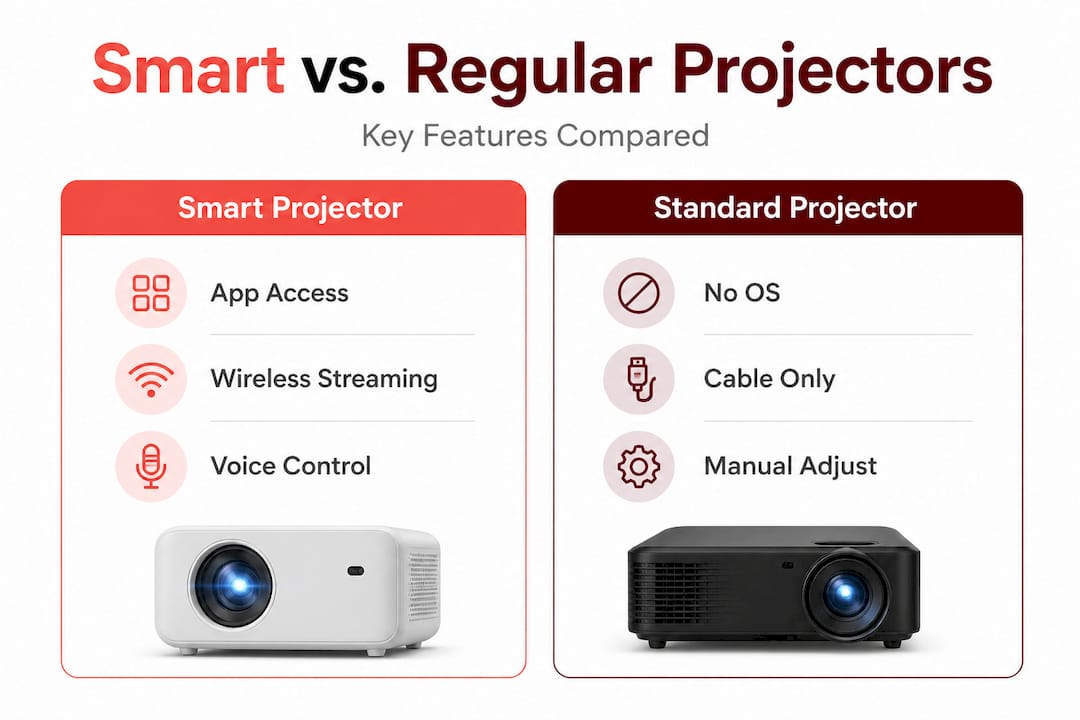
Smart projectors integrate operating systems like Google TV or VIDAA, providing native access to streaming apps such as Netflix, YouTube, Prime Video, and Disney+ without external devices. You turn the projector on and you are already inside a familiar app interface, the same way you would use a smart TV.
Here is a quick comparison to make that difference concrete:
| Feature | Regular projector | Smart projector |
|---|---|---|
| Streaming apps | Requires external device | Built-in (Netflix, YouTube, etc.) |
| Operating system | None | Google TV, VIDAA, Android TV |
| Voice control | Not available | Google Assistant or Alexa |
| Auto image correction | Manual only | AI-powered autofocus and keystone |
| Wireless connectivity | Limited or none | WiFi 6, Bluetooth 5.x, Miracast |
| Software updates | Rare | Regular OTA updates |
The must-have smart features that define modern models go well beyond just having an app store. Look for these in any smart projector you consider:
- Certified streaming apps with stable, full-featured playback
- Onboard processor and RAM sufficient for smooth app navigation
- Automatic image alignment including autofocus and keystone correction
- Wireless audio and video streaming without dongles
- Voice assistant integration for hands-free control
- Regular firmware updates to maintain security and compatibility
"Certification matters more than most buyers think. A projector running a non-certified version of Netflix will lose features, show lower resolution streams, or crash unexpectedly. Always verify that the model you choose carries official app licensing before purchasing." — Projector industry insight
Browsing the modern projector lineup available in Malaysia today, you will see that certified Google TV models now dominate the mid-range and premium segments, making it easier than ever to find a reliable smart option at a reasonable price.
Automatic image adjustment: Autofocus, keystone and more
One of the biggest pain points with older projectors was setup time. Getting a sharp, properly aligned rectangle on your wall required a tape measure, a spirit level, and a lot of patience. Smart projectors solve this with sensor-based automation.
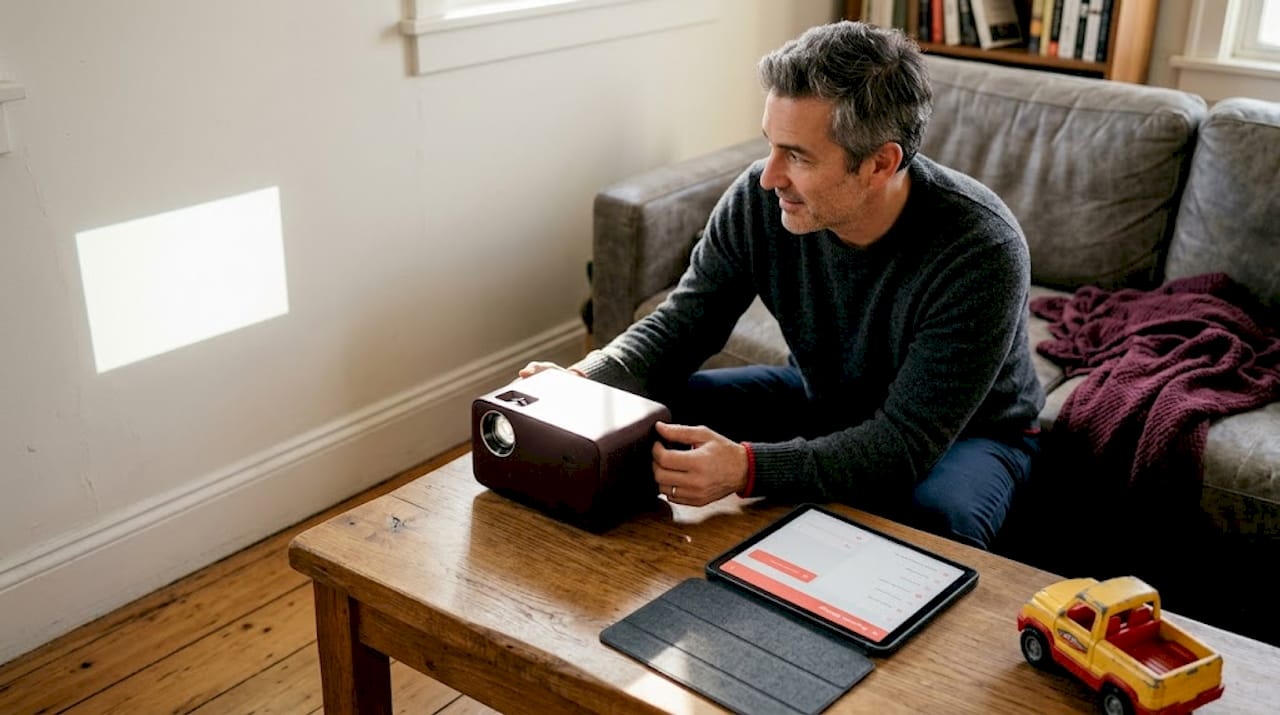
Auto-adjustment features including autofocus, auto-keystone correction, obstacle avoidance, and screen fit use sensors and AI algorithms to automatically align and sharpen the image within seconds, compensating for off-axis placement. Place the projector on a coffee table slightly to the left of center and it will still produce a clean, squared-off image without you touching a single setting.
Here is what each feature actually does:
- Autofocus uses a depth sensor or camera to measure the distance to the projection surface and adjusts the lens motor accordingly
- Auto-keystone correction detects the vertical and horizontal tilt angle and digitally reshapes the image to remove the trapezoid distortion
- Screen fit identifies the edges of a physical projection screen and crops the image to fit precisely inside the frame
- Obstacle avoidance detects objects in the projection path, like a person walking in front of the projector, and either pauses or shifts the image
"In real-world testing, auto-alignment systems on current smart projectors typically complete their full calibration cycle in under 10 seconds, making setup genuinely instant compared to the 10 to 15 minutes required for manual adjustment on older models."
There is an important trade-off to understand, though. The keystone correction process works by digitally cropping and reshaping pixels. Heavy correction, meaning the projector is placed at a steep angle, discards image data and reduces effective sharpness. For a 1080p projector placed at a severe angle, the corrected image can look closer to 720p in terms of detail.
Pro Tip: Position your projector as close to perpendicular to the screen as possible, even if auto-correction makes a tilted position work. You will get noticeably sharper text and finer detail in movie scenes. Use the keystone correction guide to find the optimal placement angles for your room.
Streaming and wireless connectivity: The cable-free advantage
Once your image is sharp, connecting to your favorite services and devices is next. Modern smart projectors treat cables as optional rather than essential, and the wireless technology behind that shift has matured significantly.
Wireless connectivity like WiFi 6, Bluetooth 5.x, Google Cast, AirPlay, and Miracast supports screen mirroring, low-latency audio pairing, and streaming without cables. WiFi 6 specifically matters because it handles multiple simultaneous connections without the congestion that older WiFi 5 routers caused in busy households.
Here is how the main wireless options compare in practical use:
| Wireless type | Primary use | Latency | Best for |
|---|---|---|---|
| WiFi 6 (built-in apps) | Streaming from internet | Very low | Netflix, YouTube, Disney+ |
| Google Cast | Mirror or cast from phone/tablet | Low | Android users |
| AirPlay | Mirror from Apple devices | Low | iPhone and Mac users |
| Miracast | Screen mirroring (no internet needed) | Medium | Laptop presentations |
| Bluetooth 5.x | Audio devices | Very low | Soundbars, headphones |
To connect your smartphone wirelessly to a smart projector for the first time, follow these steps:
- Connect both your phone and the projector to the same WiFi network
- Open the projector's settings and enable Google Cast or AirPlay depending on your device
- On your phone, swipe down to access the quick settings panel and tap "Cast" or "Screen Mirror"
- Select your projector from the list of available devices
- Confirm the connection on the projector's on-screen prompt if required
- Your phone screen will now appear on the projection surface within a few seconds
For a full walkthrough of every connection method, the wireless projector setup page covers both beginner and advanced scenarios. If you want a deeper technical breakdown of each protocol, the wireless connectivity guide explains exactly how each standard works and when to use it.
Pro Tip: Before a movie night, update both your projector's firmware and your phone's operating system. Outdated software on either device is the most common cause of dropped connections and stuttering during screen mirroring.
Next-level visuals: Dynamic contrast, HDR, and gaming enhancements
Picture clarity is just the beginning. The visual hardware inside smart projectors is what separates a good image from a genuinely cinematic one, and the gap between entry-level and premium models here is dramatic.
Dynamic contrast systems like Dynamic IRIS with DBLE algorithm adjust aperture and laser intensity frame-by-frame to improve contrast ratios up to 100,000:1, enhancing black levels and shadow detail. In practice, this means a dark cave scene in a movie will show genuine shadow depth rather than a flat gray wash.
HDR support adds another layer of realism. Dynamic tone mapping features like Auto Tone Mapping and Theater Optimizer optimize brightness, contrast, and color for HDR10, HDR10+, and Dolby Vision content, improving gradation and realism. Without proper HDR processing, a projector receiving an HDR signal will often produce a washed-out or overly bright image because it cannot correctly interpret the expanded color and brightness data.
The visual needs for movies and gaming are actually quite different:
For movies:
- High contrast ratio for deep blacks in dark scenes
- Wide color gamut (DCI-P3 coverage) for accurate skin tones and saturated colors
- HDR tone mapping for realistic highlights without clipping
- High brightness (2,000 lumens or more) for daytime viewing in Malaysian living rooms
For gaming:
- Low input latency to eliminate the lag between controller input and on-screen response
- High refresh rate support (120Hz or higher) for smooth motion
- VRR (Variable Refresh Rate) to prevent screen tearing
- ALLM (Auto Low Latency Mode) to automatically switch to game mode
Gaming performance specs on premium smart projectors now include input latency as low as 9ms to 35ms, VRR, ALLM, and refresh rates up to 240Hz, making them genuinely suitable for casual to competitive gaming. For context, most gamers consider anything under 30ms to be responsive enough for fast-paced titles. For the full picture on what gaming on a big screen actually feels like, the gaming with projectors resource is worth reading before you buy.
Pro Tip: Always check the input latency specification in game mode specifically, not the general latency figure. Many projectors have excellent game mode latency but significantly higher latency in cinema or standard modes. The difference can be 50ms or more.
Control and convenience: Voice, automation, and the smart home
Visual impact matters, but ease of control is what turns good technology into a delightful daily experience. Smart projectors have moved well beyond remote controls, and for Malaysian households already using smart home devices, the integration possibilities are genuinely useful.
Voice control via Google Assistant or Alexa enables hands-free content search, playback control, and smart home integration. You can search for a specific movie, adjust the volume, switch inputs, or even turn off the lights in your room without picking up a remote.
Practical examples of hands-free projector control include:
- "Hey Google, play Interstellar on Netflix" to launch a specific title directly
- "Alexa, pause the projector" to stop playback mid-scene
- "Hey Google, dim the lights to 20%" if your smart bulbs are linked to the same account
- "Hey Google, what is the picture mode set to?" to check settings without navigating menus
- "Alexa, turn off the projector" to power down from across the room
Smart home compatibility is worth checking carefully before you buy. Most Google TV projectors work naturally with Google Home ecosystems, while VIDAA-based models may have more limited integration. For Malaysian buyers, the key consideration is whether the voice assistant responds reliably to English commands, since regional accents and Malaysian English pronunciation occasionally cause recognition errors with some models.
Pro Tip: If you use a mix of smart home brands, choose a projector running Google TV. It has the broadest third-party compatibility in Malaysia, and Google Assistant handles Malaysian English more reliably than most alternatives currently available.
What most buyers miss about choosing smart projectors
After covering every major smart feature, the honest truth is that most buyers walk into a purchase focused entirely on the wrong numbers. They compare peak brightness figures, count HDMI ports, and debate processor cores, while completely overlooking the factors that determine whether the projector is actually enjoyable to use every single day.
The biggest overlooked issue is app certification. A projector that cannot run a certified version of Netflix is, for most Malaysian households, a fundamentally broken product. Sideloaded apps lose DRM support, drop to lower resolution streams, and stop working entirely after platform updates. This is not a minor inconvenience. It is a core functionality failure that no amount of high lumens or impressive contrast ratios can fix.
Auto-correction trade-offs are the second thing buyers miss. Marketers present auto-keystone as a feature that makes placement completely flexible. In reality, it is a tool for minor adjustments, not a license to place the projector wherever you feel like. A projector sitting at a 30-degree angle to the screen, even with perfect auto-correction, will never match the image quality of one placed straight-on. Buyers who understand this plan their room layout accordingly and get far better results.
The third blind spot is after-sales support. Malaysia's projector market includes many imported gray-market units with no local warranty coverage. When something goes wrong, and with any electronics something eventually does, the difference between a retailer with local service support and one without is enormous. The projector accessories guide is a good starting point for understanding what additional investments protect and enhance your setup long-term.
Real-world satisfaction comes from balancing three things: reliable certified apps, realistic brightness for your actual room lighting conditions, and a purchase from a retailer who will still be there when you need help six months later. Chasing the highest spec sheet number in any single category rarely produces the best experience.
Find your ideal smart projector and upgrades
Ready to transform your living room into a genuine cinematic space? Malaysia's projector specialists at ProjectorDisplay.com carry a curated range of certified smart projectors from leading brands, all backed by local warranty and expert support via WhatsApp.

Browse the latest projector deals for exclusive pricing on smart models with Google TV, laser light sources, and auto-correction technology. Whether you are setting up a dedicated home theater or upgrading a multipurpose living room, our team can recommend the right combination of projector, screen, and accessories for your space and budget. For buyers who want a smooth first-time installation, the installation tips resource walks through every step from mounting to calibration, with advice specific to Malaysian home layouts. Fast shipping covers all of Peninsular Malaysia.
Frequently asked questions
What is a smart projector and how is it different from a regular projector?
A smart projector has an onboard operating system with built-in streaming apps, eliminating the need for external streaming sticks or set-top boxes. Regular projectors require a separate source device to display any content.
Can all smart projectors stream Netflix and Disney+ reliably?
Not all smart projectors are Netflix-certified. Some require sideloading, which risks instability and lower stream quality, so always confirm official app licensing before purchasing.
Do auto-keystone and autofocus always give the best image quality?
Heavy auto-keystone correction reduces sharpness by discarding pixel data during digital reshaping. Position your projector as perpendicular to the screen as possible for the clearest result.
What wireless options do smart projectors support?
Most smart projectors offer WiFi, Bluetooth, Google Cast, AirPlay, and Miracast, covering streaming from the internet, screen mirroring from phones, and wireless audio pairing with speakers or headphones.
Which smart features matter most for gaming on a projector?
Prioritize low input latency, high refresh rates, and VRR. Gaming-focused specs like 9ms to 35ms latency and 120Hz to 240Hz refresh rates make the biggest difference in responsiveness and smooth motion during gameplay.
Recommended
- Smart Projector Features: 7 Must-Haves for Better Viewing – Projector Display
- Smart projector benefits: stunning visuals in Malaysia – Projector Display
- Top projector apps for home: upgrade movie and gaming nights – Projector Display
- Home theater projector tips for perfect movie nights – Projector Display