

TL;DR:
- Understanding projector specifications prevents costly mistakes and helps match the right projector to your environment.
- Native resolution, ANSI lumens, throw ratio, and native contrast ratio are the core measurements that matter most for performance.
Reading projector specs means understanding standardized figures like native resolution, ANSI lumens brightness, throw ratio, and native contrast ratio to make informed purchasing decisions. Most buyers in Malaysia scan a spec sheet and fixate on the biggest number, which is exactly what manufacturers count on. This guide explains how to interpret projector specifications accurately, exposes common marketing traps, and helps you match the right projector to your home theater, classroom, or boardroom in 2026.
How to read projector specs: the core measurements that matter
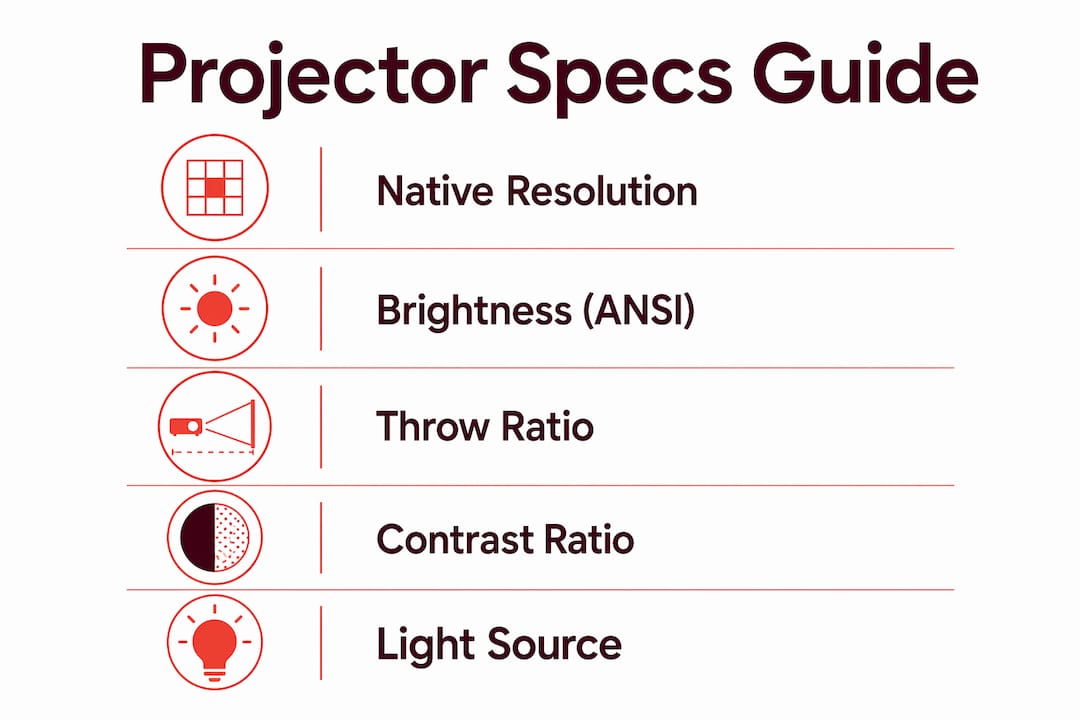
Projector specifications are standardized measurements that describe how a projector performs under controlled conditions. The industry relies on four primary figures: native resolution, ANSI lumens, throw ratio, and native contrast ratio. Understanding each one prevents costly mistakes.
Native resolution vs. supported resolution
Native resolution is the actual number of pixels the projector's imaging chip produces. Supported resolution is the highest signal the projector can accept, which it then downscales to fit its native chip. A projector labeled "4K supported" accepts a 4K signal but may display it at 1080p. True native 4K means 8.3 million distinct pixels on the imaging chip. That distinction matters enormously for home cinema and large-screen education setups. For business presentations and classrooms, native 1080p is the minimum for sharp text and detailed slides.
Brightness: ANSI lumens vs. marketing lumens
Brightness is measured in ANSI lumens, a standardized method that averages light output across nine points on the projected image. Some manufacturers list "LED lumens," "display lumens," or simply "lumens" without specifying the standard. Projectors without ANSI or ISO lumen ratings should be treated with suspicion. The ANSI figure is always lower than marketing lumens because it reflects real-world output, not peak brightness under ideal conditions.
Throw ratio and what it means for placement
Throw ratio is the formula: throw distance divided by image width. A throw ratio of 1.5 means the projector needs 1.5 meters of distance to produce a 1-meter-wide image. Throw ratio determines exactly where you mount or place the projector in a room. Short-throw projectors have ratios below 0.5 and work well in small Malaysian classrooms or living rooms where ceiling height or wall distance is limited.
Native contrast ratio vs. dynamic contrast
Native contrast ratio measures the difference between the brightest white and darkest black the projector produces simultaneously. Dynamic contrast uses iris or lamp dimming tricks to inflate the number. Native contrast is the meaningful figure for perceptible image quality. A projector claiming a dynamic contrast of 1,000,000:1 may have a native contrast of only 1,500:1, which is the number that actually affects what you see on screen.
Pro Tip: When comparing projectors across brands, contrast ratios are unreliable for cross-brand comparisons. Use expert reviews and real-world test results to verify contrast performance before buying.
Light source: laser vs. LED vs. lamp
Laser projectors last 20,000–30,000 hours, which means years of use without a bulb replacement. Lamp-based projectors typically require a new projector lamp in Malaysia every 3,000–5,000 hours, adding ongoing cost. Laser is now the industry standard for home and business use in 2026, offering color stability and instant on/off capability. LED sits between lamp and laser in lifespan and suits portable or low-brightness applications.
How to match projector specs with your room and application
Specs on paper mean nothing without context. The right projector for a dark home theater in Petaling Jaya is completely different from the right projector for a sunlit training room in Kuala Lumpur. Environment and application must come first.
-
Assess ambient light first. Dark home theater rooms need 1,000–2,000 ANSI lumens. Moderate offices and classrooms with partial light control require 2,500–4,500 ANSI lumens. Large venues or rooms with uncontrolled ambient light need 5,000 or more ANSI lumens. Buying a 3,500-lumen projector for a dark room wastes money and washes out color.
-
Match throw ratio to room dimensions. Measure the distance from your intended mounting point to the screen wall before shortlisting any model. A standard throw projector in a 3-meter-deep room produces a much smaller image than the same projector in a 5-meter room. Short-throw and ultra-short-throw models solve space constraints in Malaysian apartments and compact classrooms.
-
Choose resolution based on content type. Home cinema benefits most from native 4K for large screens above 100 inches. Business presentations and education use cases perform well at native 1080p, which renders text and charts clearly without the premium cost of 4K. Avoid projectors with native 720p for any professional application in 2026.
-
Check color gamut and HDR support for cinema use. HDR support (HDR10 or Dolby Vision) expands the range of colors and contrast visible on screen. For home theater, a wide color gamut covering Rec.709 or DCI-P3 produces noticeably richer images. Business projectors rarely need HDR, so this spec matters mainly for home entertainment buyers.
-
Verify input lag for gaming or interactive use. Competitive gaming requires input lag under 15ms at 4K/60Hz. High-frame-rate gaming at 1080p/240Hz demands below 5ms. Interactive classroom presentations benefit from low input lag too, since delays between touch input and screen response disrupt lessons. Always verify input lag from independent reviews, not marketing copy.
Pro Tip: For Malaysian buyers using a projector in a room with open windows or fluorescent lighting, prioritize ANSI lumens above all other specs. A brighter projector forgives more environmental imperfections than a higher-resolution one.
What marketing traps should you watch out for in projector specs?
Manufacturers inflate several figures consistently. Knowing which numbers to distrust saves you from buying a projector that underperforms in your actual room.
-
"4K Supported" is not native 4K. This label means the projector accepts a 4K input signal but downscales it to a lower native resolution. Native 4K requires 8.3 million pixels on the imaging chip. Pixel-shifting technology moves a lower-resolution chip rapidly to simulate 4K, which produces a sharper image than 1080p but does not match true native 4K.
-
Dynamic contrast ratios are marketing figures. A spec sheet showing 500,000:1 dynamic contrast sounds impressive. The native contrast ratio, which is the only figure that reflects real image quality, is usually a fraction of that number. Always ask for or search for the native contrast specification.
-
Non-ANSI lumen labels inflate brightness. "LED lumens" and unspecified "lumens" figures are not standardized. Only ANSI or ISO lumens are reliable brightness measurements. A projector claiming 8,000 LED lumens may deliver the equivalent of 2,000 ANSI lumens in practice.
-
Refresh rate without input lag data is incomplete. A projector advertising 120Hz refresh rate sounds ideal for gaming. Without a confirmed input lag figure from a credible source, the refresh rate number alone tells you nothing about actual gaming performance.
Specs are best used to compare models within the same brand. Contrast ratios and lumen figures are unreliable across brands, so always consult expert reviews and real-world test results before committing to a purchase.
Step-by-step approach to evaluate projector specifications
A structured approach to reading projector specification sheets prevents the most common buying mistakes. Follow these steps before shortlisting any model.
-
Define your use case and room environment. Write down the room dimensions, ambient light level, and primary use: home cinema, classroom, boardroom, or gaming. Environment and application determine which specs matter most. This step alone eliminates most mismatched purchases.
-
Set a minimum ANSI lumen threshold. Use the brightness ranges above to establish a floor. Do not consider any projector below that floor regardless of other specs.
-
Confirm native resolution. Check the spec sheet for the word "native" next to the resolution figure. If the sheet only lists "supported" or "compatible" resolution, the native resolution is lower.
-
Calculate throw ratio compatibility. Divide your available throw distance by your desired image width. Match that number to the projector's listed throw ratio range. A projector with a throw ratio of 1.2–1.5 needs 1.2–1.5 meters of distance per meter of image width.
-
Read native contrast ratio, not dynamic. If the spec sheet only lists dynamic contrast, search for independent reviews that measure native contrast directly.
-
Check light source type and rated lifespan. Laser projectors rated at 20,000–30,000 hours reduce long-term maintenance costs significantly compared to lamp-based models. For Malaysian buyers who run projectors daily in schools or offices, this difference adds up fast.
-
Verify input lag from independent sources. Manufacturer input lag claims are often measured under specific conditions. Trusted review sites test input lag independently, which gives a more accurate picture for gaming or interactive use.
| Spec | What to look for | Why it matters |
|---|---|---|
| Native resolution | "Native" label on spec sheet | Determines actual image sharpness |
| Brightness | ANSI or ISO lumens figure | Reflects real-world light output |
| Throw ratio | Numeric range (e.g., 1.2–1.5) | Determines projector placement distance |
| Native contrast | Separate from dynamic contrast | Reflects true black and white range |
| Light source lifespan | Hours rated (laser: 20,000–30,000) | Indicates long-term maintenance cost |
Key Takeaways
Reading projector specs accurately requires prioritizing native resolution, ANSI lumens, throw ratio, and native contrast ratio over inflated marketing figures.
| Point | Details |
|---|---|
| ANSI lumens is the only reliable brightness measure | Ignore non-standardized lumen labels; match brightness to your room's ambient light level. |
| Native resolution beats supported resolution | Always confirm the "native" label; "4K supported" does not mean native 4K output. |
| Throw ratio determines placement | Calculate throw distance divided by image width before shortlisting any model. |
| Native contrast is the meaningful figure | Dynamic contrast ratios are marketing numbers; native contrast reflects real image quality. |
| Laser light sources reduce maintenance | Laser projectors rated at 20,000–30,000 hours cost less to maintain than lamp-based models. |
What I've learned from years of watching buyers get burned by spec sheets
The most common mistake Malaysian buyers make is treating the spec sheet as a performance guarantee. It is not. A spec sheet describes controlled-condition measurements. Your living room in Shah Alam or your training room in Cyberjaya is not a controlled environment.
The buyers who get it right always start with the room, not the spec sheet. They measure the throw distance, assess the ambient light, and decide on screen size before they open a single product page. That sequence matters. A projector with great specs but wrong throw ratio for your room is a projector you will resell within six months.
Laser light sources deserve more attention than they get from first-time buyers. The upfront cost is higher, but the absence of projector lamp replacement costs in Malaysia over a 5-year period makes laser the smarter financial choice for schools, offices, and serious home theater setups. Lamp projectors are not obsolete, but they require a maintenance budget that buyers rarely factor in at purchase time.
My strongest advice: use spec sheets to filter, not to decide. Narrow your list using ANSI lumens, native resolution, and throw ratio. Then read independent reviews to confirm real-world performance. The spec sheet gets you to a shortlist. Reviews get you to the right answer.
— Projector
Projectors for every setting, available at Projectordisplay
Projectordisplay carries a curated selection of projectors for home theater, business presentations, education, and large venues across Malaysia, including models from Epson, BenQ, Viewsonic, Optoma, Panasonic, and more. Whether you need a wireless projector Malaysia buyers rely on for conference rooms or the best classroom projector for a school in Johor, the catalog covers every use case and budget.
The team at Projectordisplay provides expert guidance on matching specs to your specific room and application, including advice on projector screen options and accessories. For buyers evaluating large-room installations, the guide on projectors for large rooms explains exactly why throw distance and brightness matter more than screen size alone. Fast shipping across Peninsular Malaysia and WhatsApp support make the buying process straightforward from shortlist to installation.
FAQ
What does ANSI lumens mean on a projector spec sheet?
ANSI lumens is a standardized brightness measurement that averages light output across nine points on the projected image. It is the only reliable figure for comparing projector brightness across models.
What is the difference between native and supported resolution?
Native resolution is the actual pixel count on the projector's imaging chip. Supported resolution is the highest signal the projector accepts, which it downscales to fit its native chip.
How many lumens do I need for a Malaysian classroom or office?
Classrooms and offices with moderate ambient light require 2,500–4,500 ANSI lumens. Rooms with strong natural light or no blackout curtains need 5,000 or more ANSI lumens for a clear image.
Why does throw ratio matter when buying a projector?
Throw ratio determines how far the projector must sit from the screen to produce a given image size. Choosing the wrong throw ratio for your room results in an image that is too small or requires impossible placement.
Is a laser projector worth the higher price in Malaysia?
Laser projectors last 20,000–30,000 hours and require no lamp replacements, making them more cost-effective over time for daily-use environments like schools, offices, and dedicated home theaters.
Recommended
- Malaysia Projector Buying Guide: Features, Tips & Choices – Projector Display
- Projector FAQ Malaysia: Your Complete Guide to Smart Buying – Projector Display
- Best Projector in Malaysia: 2026 Buyer's Guide – Projector Display
- Projector Bulbs for Sale in Malaysia: 2026 Buyer's Guide – Projector Display