
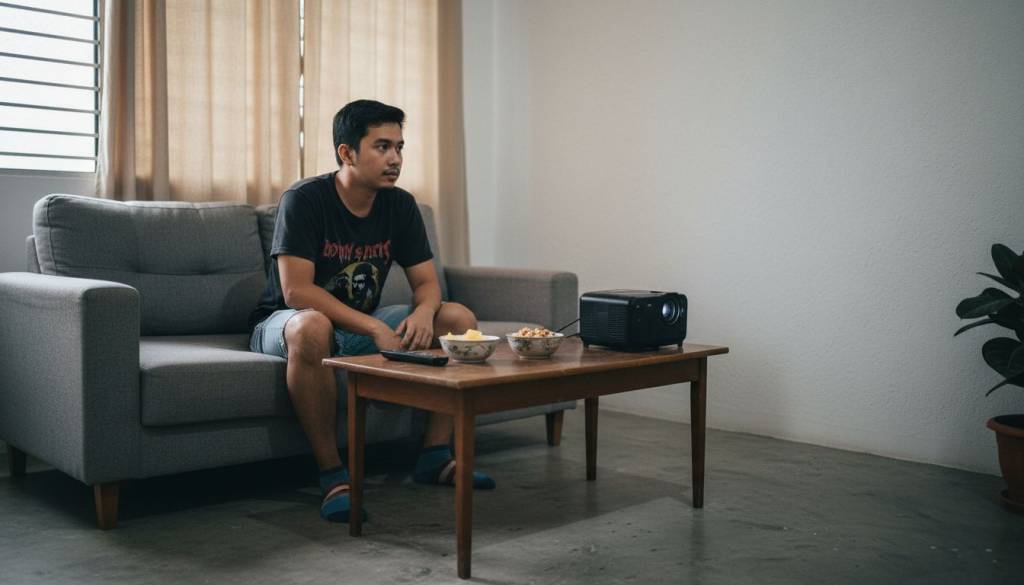
Trying to set up a home theater in a small Malaysian apartment can feel impossible when every square foot counts. Oversized projectors and tangled cables often leave you with an awkward setup and less-than-ideal viewing experience. You want great picture quality and smart features, but there is no extra room to waste.
The good news is, the right projector can transform even the most compact space. By focusing on proper sizing, short throw technology, and flexible wireless connections, you can enjoy impressive visuals without clutter. This list reveals the must-know tips and features that help small rooms deliver big entertainment.
By the end, you will know exactly how to choose, set up, and optimize your projector for clear images and maximum comfort, all in your own space. Don't miss out on insights that will make your next movie night feel like a private cinema.
Table of Contents
- 1. Choose The Right Size Projector For Small Rooms
- 2. Why Short Throw Projectors Maximize Space
- 3. Best Features For Easy Wireless Connectivity
- 4. Setting Up Your Compact Projector In Tight Areas
- 5. Top Picks: Best Value Small Room Projectors
- 6. Tips For Clear Images In Limited Lighting
Quick Summary
| Key Message | Explanation |
|---|---|
| 1. Choose the right projector size | Properly sized projectors enhance effectiveness and comfort in small rooms by matching dimensions to space and viewing distance. |
| 2. Utilize short throw projectors | Short throw projectors maximize usable space by displaying large images from close distances, reducing required floor space in compact environments. |
| 3. Ensure easy wireless connectivity | Projectors with wireless features simplify content sharing, allowing seamless streaming from devices without cluttering with cables. |
| 4. Plan for tight setup spaces | Careful spatial planning and measurement ensure optimal projector placement, improving viewing angles and reducing installation challenges. |
| 5. Prioritize image clarity in lighting constraints | Adjusting settings related to brightness and contrast improves image clarity, making it possible to enjoy sharp visuals even in low-light conditions. |
1. Choose the Right Size Projector for Small Rooms
Getting the projector size right makes or breaks your small room home theater experience. A projector that is too large will overwhelm your space, while one that is too small leaves you squinting at the screen.
Projector sizing is about matching the device to your room dimensions and viewing distance. Research on interactive projectors in compact spaces demonstrates that properly sized projectors maximize both effectiveness and comfort in confined environments.
Here's why size matters so much:
- Throw distance is the gap between your projector and screen. Small rooms need short-throw or ultra-short-throw projectors that work within tight spaces.
- Screen size should match your viewing distance. Sit too close to a large screen and you'll strain your neck watching the action.
- Image clarity depends on proper scaling. A projector designed for small rooms delivers sharper, brighter images than undersized units pushing their limits.
- Installation flexibility increases with the right projector. Compact models fit on shelves, desks, or ceiling mounts without dominating your room.
Choosing a projector sized for your room transforms small spaces into impressive home theaters without wasted space or compromised comfort.
For Malaysian urban millennials living in compact apartments, understanding throw ratios becomes critical. Many small room projectors in Malaysia offer throw ratios between 0.5:1 and 1.2:1, meaning they can project a 100-inch screen from just 5 to 12 feet away.
Calculate your ideal screen size using this formula:
- Measure your viewing distance (couch to wall in feet)
- Divide by 1.5 to 2 for optimal screen dimensions
- Match that size to projector specifications
For example, if you sit 10 feet from your wall, aim for a 50 to 67-inch screen. This gives you comfortable viewing without neck strain.
Pro tip: Before purchasing a projector, measure your room's depth and ceiling height, then check the projector's throw ratio specifications to ensure it actually fits your space without installation headaches.
2. Why Short Throw Projectors Maximize Space
Short throw projectors are game changers for Malaysian apartments where every square foot counts. These projectors can display massive images from just a few feet away, freeing up valuable floor space in your living room.
Understanding how short throw technology works reveals why it transforms small rooms. Traditional projectors need 10 to 15 feet of distance to create a large image. Short throw models accomplish the same result using just 3 to 6 feet, thanks to advanced lens designs that bend light more efficiently.
Here's what makes them space savers:
- Mounting flexibility means you can place projectors on shelves, desks, or near your screen without sacrificing seating area.
- Reduced cable clutter occurs because devices sit closer to walls, making cord management simpler and less visible.
- No projector shadows appear on your screen since the unit projects from just in front of it rather than from across the room.
- Furniture arrangement stays natural because you are not forced to position your couch far from walls to accommodate projection distance.
Short throw projectors let you keep your room layout flexible while enjoying theater-sized images in compact spaces.
The technology behind this efficiency involves compact design principles that maximize performance within minimal spatial footprints. Short throw projectors use specially curved glass elements and mirror systems to concentrate light output into smaller areas.
Practical benefits for your Malaysia apartment setup:
- Mount your projector on a wall shelf instead of ceiling, maintaining accessibility for maintenance
- Position your seating naturally without awkward spacing to accommodate throw distance
- Use tabletop placement for portable setups that move between rooms
- Store the projector easily when not in use thanks to compact dimensions
Many best projector options in Malaysia now feature short throw technology, making them ideal for the typical apartment layout. You gain access to 100-plus-inch screens without requiring a dedicated home theater room.
Pro tip: Check the throw ratio specification before buying any projector for Malaysia apartments, and measure your actual space to confirm the projector will fit between your mounting location and screen wall.
3. Best Features for Easy Wireless Connectivity
Wireless connectivity transforms your small room projector from a stationary device into a flexible entertainment hub. You can stream content directly from your smartphone, laptop, or tablet without fumbling with cables and adapters.
The best small room projectors include wireless technologies that make setup and daily use painless. Modern projectors support WiFi, Bluetooth, and sometimes proprietary wireless protocols that communicate seamlessly with your devices.
Look for these essential wireless features:
- WiFi direct connection lets your phone connect to the projector without needing your home network, perfect for quick streaming.
- Dual band WiFi support (2.4GHz and 5GHz) provides stronger signals and faster data transfer in crowded Malaysian apartment buildings.
- Multiple device pairing allows several phones, tablets, or laptops to connect simultaneously for presentations or group streaming.
- Auto-connect memory saves your favorite devices so future connections happen instantly without manual setup.
- Low latency wireless ensures smooth video playback without lag, critical for gaming and fast-action content.
Wireless connectivity eliminates cable management headaches while letting you control your home theater from anywhere in the room.
Research on interactive wireless connectivity features demonstrates that seamless device integration significantly improves user experience and engagement in compact entertainment spaces. When wireless connectivity works smoothly, you spend more time enjoying content and less time troubleshooting connections.
For Malaysian users, wireless features matter even more. Dense apartment complexes create WiFi interference, so projectors supporting advanced wireless technologies with beamforming capabilities deliver stronger, more reliable signals.
Practical wireless setup steps:
- Place your projector within 25 feet of your WiFi router for stable connection
- Use the 5GHz band if your devices support it for faster streaming speeds
- Download the projector manufacturer's app to access additional wireless features
- Test wireless connection before inviting friends over to watch movies
Pro tip: Position your projector at least 3 feet away from your WiFi router to avoid signal interference, and restart both devices if wireless connection drops during playback.
4. Setting Up Your Compact Projector in Tight Areas
Setting up a projector in a small Malaysian apartment requires strategic planning and careful placement. One wrong decision leaves you with poor viewing angles or cables snaking across your living room.
Proper spatial planning starts before you purchase your projector. Measure your room dimensions, identify your preferred screen location, and account for furniture placement. This groundwork prevents costly mistakes and frustration.
Key setup considerations for tight spaces:
- Ceiling height must accommodate mounting hardware if you choose ceiling installation, typically requiring at least 8 feet of clearance.
- Wall space should have unobstructed area for your screen, free from windows and light sources that create glare.
- Ventilation access around the projector prevents overheating, so avoid placing units in enclosed cabinets or corners with poor airflow.
- Viewing distance from your seating area determines screen size and projector placement, as discussed earlier.
- Cable routing needs planning to keep wires organized and out of walkways where they create tripping hazards.
Careful spatial planning transforms cramped setups into functional, beautiful home theaters that maximize every square foot.
Research on spatial clearance requirements demonstrates that thoughtful device placement improves both safety and functionality in confined areas. Projectors need breathing room around them to operate efficiently.
Mount your projector using one of these methods:
- Ceiling mount directly above seating for clean, professional appearance with minimal visible cables
- Wall shelf placement 6 to 12 inches below ceiling for accessible maintenance and easy adjustments
- Short-throw stand positioned in front of or beside your screen for completely portable setup
- Corner installation using angled mounts that save floor space while providing optimal projection angles
The best home theater projector setups in Malaysia apartments often combine short-throw technology with shelf mounting, eliminating the need for ceiling installation while maintaining clean aesthetics. This approach works perfectly for renters who cannot modify walls.
Measurement steps for tight area setup:
- Mark your intended screen location on the wall
- Measure projection distance from that wall back toward furniture
- Check ceiling height and identify mount points
- Verify WiFi router placement ensures strong signal at projector location
- Plan cable paths before purchasing mounting hardware
Pro tip: Create a simple floor plan sketch of your room with projector placement, screen location, and furniture positions before making any installation decisions.
5. Top Picks: Best Value Small Room Projectors
Finding the best value projector means balancing features, performance, and price without compromising on what matters most. The best projector seller in Malaysia offers options across multiple price points, each delivering solid performance for small spaces.
Value does not mean cheapest. It means getting maximum features and reliability for your budget. A projector that costs slightly more but lasts five years delivers better value than a budget model that fails after two years.
What to prioritize when comparing value:
- Brightness (lumens) between 2000 and 3500 for small rooms provides excellent image quality without overwhelming your space.
- Native resolution of at least 1080p ensures crisp, detailed images for movies, gaming, and presentations.
- Lamp lifespan of 5000 to 10000 hours reduces replacement costs over time.
- Warranty coverage of at least two years protects your investment against defects.
- Built-in speakers eliminate the need for external audio systems in budget-conscious setups.
Smart value shoppers focus on total cost of ownership, not just purchase price, to find projectors that deliver long-term satisfaction.
When evaluating affordable projectors for home theater, research real user reviews from Malaysian buyers who have experience with your climate and apartment conditions. Humidity and heat affect projector performance differently than in other regions.
Best value categories for small rooms:
- Entry-level projectors (RM800-1500) work perfectly for casual movie watching and gaming in small apartments
- Mid-range options (RM1500-3000) add wireless connectivity and improved brightness for more demanding users
- Premium compact models (RM3000-5000) deliver cinema-quality images with advanced features like laser illumination
Laser-illuminated projectors represent excellent long-term value despite higher upfront costs. Research on laser projector technology and safety confirms these systems maintain consistent brightness for 20000 hours or more, significantly extending ownership value.
Comparison tips for Malaysian shoppers:
- Check if the best projector brand in Malaysia offers local warranty support
- Verify lumens output under typical room lighting conditions, not just specifications
- Test wireless connectivity at the shop before purchasing
- Ask about discount bundles that include screens or stands
Pro tip: Purchase your projector from the best projector shop in Malaysia that offers hassle-free returns within 30 days, allowing you to test it in your actual apartment lighting before committing.
6. Tips for Clear Images in Limited Lighting
Limited lighting is the reality in most Malaysian apartments, yet it should not prevent you from enjoying crystal-clear projector images. The key is understanding how light, brightness, and image settings work together to deliver sharp, vibrant pictures.
Image clarity depends on multiple factors beyond just projector brightness. Contrast ratio, focus precision, and room lighting all play critical roles in what you see on your screen. Mastering these elements transforms mediocre images into impressive displays.
Here's how brightness affects your viewing experience:
- Higher lumens (3000 plus) overcome ambient light better, making images visible even with some lights on.
- Lower lumens (under 2000) require darker rooms but work perfectly for nighttime viewing in small spaces.
- Contrast ratio determines how deep blacks appear and how vivid colors pop, separate from brightness.
- Lens quality affects sharpness more than you might expect, as lower-quality optics blur even bright images.
- Projector positioning influences perceived image clarity by ensuring proper focus and minimal keystoning distortion.
The brightest projector means nothing if poor focus and room lighting destroy image sharpness and color accuracy.
Research on imaging sensor performance demonstrates that environmental conditions significantly impact perceived image quality. Projectors in limited lighting need proper calibration and maintenance to deliver optimal results.
Practical steps to optimize image clarity:
- Clean your projector lens monthly to remove dust that accumulates in Malaysian tropical humidity
- Adjust focus using the lens ring until text appears razor-sharp on your screen
- Use the best projector screen in Malaysia, which reflects light more efficiently than bare walls
- Position your projector perpendicular to the screen to minimize keystone correction, which reduces sharpness
- Apply color calibration settings specific to your room's ambient light conditions
Lighting design principles matter too. Strategic use of effective indoor lighting helps you control reflections and glare that wash out projected images. Consider blackout curtains or strategic lamp placement.
Image quality troubleshooting:
- Blurry images usually indicate focus problems rather than projector defects
- Dim images might mean you need higher lumens or a darker room, not a new projector
- Color distortion often comes from incorrect color temperature settings
- Keystoning issues require proper mounting angle adjustment
Pro tip: Test image clarity during daytime with some lights on before purchasing, ensuring the projector's brightness handles your actual room conditions rather than just specifications.
Below is a table summarizing the strategies, technical considerations, and practical tips for setting up projectors for small rooms discussed in the article.
Transform Your Small Room Into a Stunning Home Theater Today
Struggling to find the perfect projector that fits your compact Malaysian apartment without sacrificing image quality or space Think about how short-throw projectors and wireless connectivity can revolutionize your viewing experience by maximizing every inch of your room while eliminating cable clutter At ProjectorDisplay.com we specialize in providing a diverse range of projectors tailored specifically for small rooms including portable, laser, and short-throw models designed for urban living

Explore our collection now and discover how easy it is to match your space with the right projector specifications such as throw ratio and brightness Our expert guidance and trusted products ensure your setup will feel like a true home theater without the hassle Act quickly because achieving crystal-clear images and perfect placement starts with choosing the right equipment from trusted sellers Visit ProjectorDisplay.com to find your ideal small room projector and start enjoying immersive entertainment like never before
Frequently Asked Questions
What is the ideal throw distance for small room projectors?
The ideal throw distance for small room projectors usually ranges between 3 to 6 feet, depending on the projector type. To determine the best fit, measure your available space and choose a projector that can project a large image without overwhelming the room.
How do I calculate the right screen size for my small room?
To calculate the right screen size, measure the viewing distance from your seating to the wall and divide that by 1.5 to 2. For example, if your viewing distance is 10 feet, aim for a screen size between 50 and 67 inches for optimal comfort.
How can I ensure good wireless connectivity for my small room projector?
To ensure good wireless connectivity, place your projector within 25 feet of your WiFi router and utilize the 5GHz band for better speeds. This setup minimizes lag and improves streaming performance, especially in densely populated areas.
What features should I look for in a projector for limited lighting conditions?
When choosing a projector for limited lighting, look for one with higher lumens (ideally over 3000) to ensure good image visibility. Additionally, consider projectors with a good contrast ratio and high-quality lens to maintain sharp, vibrant images even in less-than-ideal lighting.
How can I optimize the setup of my projector in a tight space?
To optimize your projector setup in a tight space, measure your room dimensions carefully and plan where to place the screen and furniture. Ensure you maintain proper ventilation around the projector and choose a mounting method, such as a wall shelf, to maximize your available space.
What is the difference between short throw and standard projectors for small rooms?
Short throw projectors can project large images from just a few feet away, making them ideal for small rooms. In contrast, standard projectors require greater distances to create the same size image, which could be challenging in compact spaces. Choose a short throw model to save space and maintain flexible seating arrangements.