

TL;DR:
- Projectors enhance hybrid meetings by providing large, clear visuals accessible to both in-room and remote participants. Proper alignment of cameras, lighting, and display size is essential to ensure inclusive, effective communication. Selecting the right projector involves considering brightness, resolution, connectivity, and room configuration to optimize meeting productivity.
Projectors are the primary visual hub in hybrid meetings, delivering large-scale images that keep every participant, whether in the room or joining remotely, aligned on the same content. 52% of remote-capable employees now work in hybrid arrangements, according to a 2025 Gallup study. That shift makes display quality a direct factor in meeting productivity. A projector gives a room the visual scale that laptops and small monitors simply cannot match, and that scale changes how teams communicate, present data, and make decisions together.
How projectors improve collaboration in hybrid meetings
The role of projectors in hybrid meetings goes beyond showing slides. Projectors deliver large-scale immersive visuals that improve engagement by ensuring every person in the room can see shared content clearly. Remote participants benefit too, because a well-projected image means the in-room camera captures a clean, readable display rather than a washed-out monitor screen.

Projectors also support inclusive participation in ways that smaller displays cannot. When a team reviews a complex financial model or an architectural drawing, a projected image at 100 inches or more lets every seat in the room read the fine detail without anyone leaning forward or asking for a zoom-in. That clarity reduces misunderstandings and shortens decision cycles.
Modern projectors integrate with software enabling camera control and diverse content display, moving well beyond traditional presentation tools. A projector connected to a video conferencing platform like Microsoft Teams or Zoom can show the remote gallery view alongside a shared document, giving in-room attendees full context. This dual-display capability is one of the strongest arguments for projectors in any team collaboration setup.
Key collaboration benefits of projectors in hybrid rooms include:
- Shared visual context: Every attendee sees the same image at the same size, reducing information gaps between in-room and remote participants.
- Detailed data display: Spreadsheets, engineering drawings, and dense reports are readable at projected scale in ways a 55-inch monitor cannot replicate.
- Flexible content switching: Presenters can switch between a conferencing feed, a shared document, and a whiteboard without disrupting the meeting flow.
- Reduced screen fatigue: A large projected image is easier on the eyes during long sessions compared to staring at a small monitor.
Pro Tip: Position the projector screen directly behind or beside the main camera so remote participants see the presenter and the content in the same frame. This small adjustment dramatically improves the remote viewing experience.
What features matter when choosing projectors for conferencing?
Selecting the right projector for a hybrid meeting room requires matching specifications to the room's actual conditions. The wrong choice creates glare, blurry text, or connectivity headaches that derail meetings before they start. Projectordisplay recommends evaluating four core areas before purchasing.
-
Brightness (lumens): A room with windows or overhead lighting needs at least 3,500 lumens to maintain a readable image. Dedicated dark rooms can work with 2,500 lumens, but conference rooms rarely stay dark. Laser projectors from brands like Epson and Viewsonic Malaysia maintain consistent brightness over their lifespan without lamp replacements, making them a strong choice for high-use meeting rooms.
-
Resolution: Full HD (1920×1080) is the minimum for business use. 4K resolution becomes worthwhile in large boardrooms where detailed content like CAD drawings or financial dashboards is a regular requirement. A blurry image at 150 inches is worse than a sharp image at 100 inches.
-
Connectivity: Standardized connectivity like USB-C and Miracast reduces IT support tickets by over 40%. HDMI remains the most universal wired option, but wireless mirroring via Miracast or AirPlay removes the cable clutter that slows down meeting starts. A wireless projector Malaysia setup is particularly useful in rooms where multiple presenters rotate frequently.
-
Portability vs. fixed installation: Fixed ceiling-mounted projectors suit dedicated boardrooms. Portable projectors suit flexible spaces where rooms serve multiple purposes across the week.
| Feature | Fixed installation | Portable unit |
|---|---|---|
| Best for | Dedicated boardrooms | Multi-purpose rooms |
| Setup time | One-time installation | Minutes per session |
| Brightness range | 4,000+ lumens typical | 2,500–4,000 lumens |
| Cost | Higher upfront | Lower upfront |
| Connectivity | Hardwired + wireless | Primarily wireless |
Pro Tip: When evaluating a projector for business meetings, always test it in the actual room at the time of day when meetings most frequently occur. Ambient light conditions at 9:00 AM differ significantly from those at 3:00 PM.
What are the biggest challenges in projector setup for hybrid rooms?
A projector setup for hybrid meetings introduces specific logistical challenges that flat panels do not. Addressing these challenges before installation saves significant time and frustration later.
Proper camera placement in projector rooms is critical to avoid blocked sightlines and maintain professional remote participant views. The most common mistake is mounting the camera at the back of the room, which captures attendees from behind and makes the projected screen unreadable to remote participants. The camera should sit at the front of the room, level with the screen, so remote attendees see faces and content together.
Ambient light management is the second major challenge. Projectors lose image quality in bright rooms, and conference rooms with floor-to-ceiling windows are particularly difficult. Blackout blinds or motorized shades solve the problem in dedicated rooms. For flexible spaces, a short-throw projector reduces the light path and maintains better contrast even in moderately lit environments.
Common setup challenges and their solutions:
- Keystone distortion: Use a projector with automatic keystone correction or mount it at the correct angle to avoid trapezoidal images.
- Cable management: Plan cable runs during installation. Exposed cables create tripping hazards and look unprofessional on video calls.
- Lamp maintenance: Lamp-based projectors require bulb replacements every 3,000–5,000 hours. Laser projectors eliminate this maintenance cycle entirely.
- Room size mismatch: A projector rated for a 100-inch image in a room that needs 150 inches will produce a dim, washed-out result. Always calculate throw distance before purchasing.
- Audio integration: The projector handles visuals, but the room still needs a dedicated microphone and speaker system. A hybrid meeting projection setup requires a computer, stable internet, microphone, camera, and a connected projector for complete functionality.
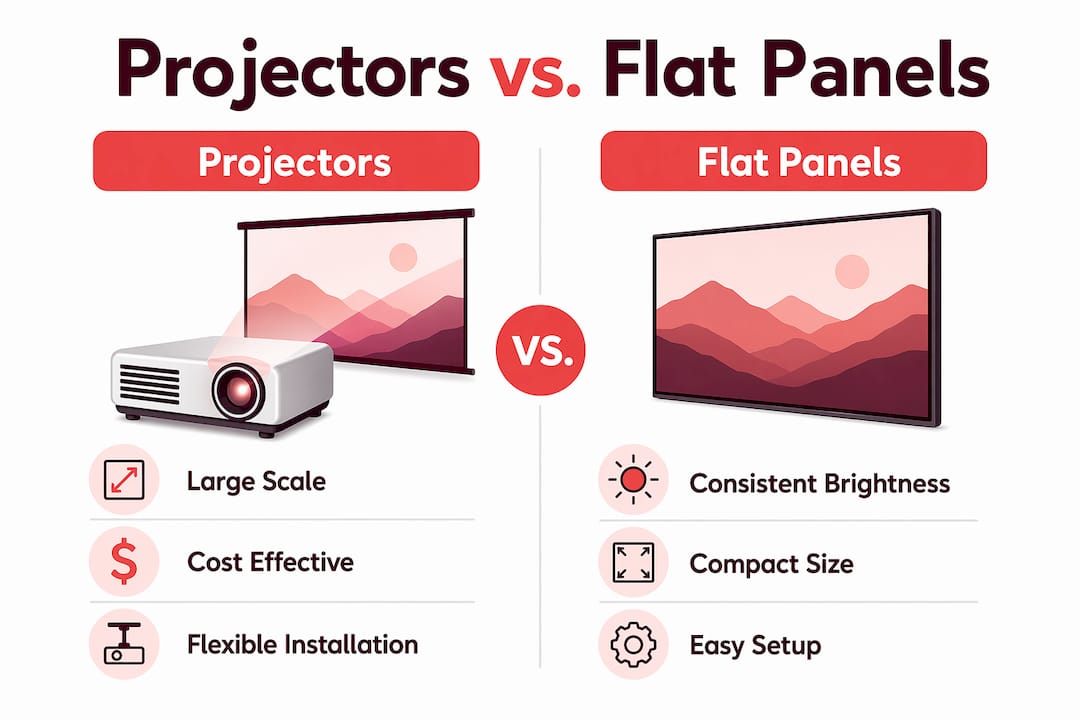
Projectors vs. flat-panel displays: which suits hybrid meetings?
The projector versus flat-panel debate is not about which technology is better in the abstract. Room conditions and usage patterns should drive the choice, not brand preferences or assumptions about modernity.
Projectors remain the most practical way to display detailed architectural or spreadsheet data in large rooms, where flat panels are costly and difficult to install at equivalent scale. A 150-inch projected image costs a fraction of what a commercial flat panel of the same size would require, and installation is far simpler. For large divisible spaces, projectors enable cost-effective large visuals for detailed content that flat panels cannot match economically.
Flat panels have clear advantages in smaller rooms. They deliver consistent brightness regardless of ambient light, require no warm-up time, and are easier for non-technical users to operate. A 75-inch flat panel in a six-person meeting room is a practical, low-maintenance choice. The reasons projectors beat screens become most apparent once the room exceeds 12 people or the required image size exceeds 100 inches.
| Criteria | Projector | Flat-panel display |
|---|---|---|
| Image size | 80–300+ inches | 55–110 inches typical |
| Ambient light performance | Requires management | Excellent |
| Cost at large scale | Low | Very high |
| Installation complexity | Moderate | Low |
| Best room size | Large (12+ people) | Small to medium |
| Maintenance | Lamp or laser lifespan | Minimal |
A hybrid strategy using fixed high-end projectors for boardrooms and portable interactive projectors for flexible rooms maximizes resource use across an organization. This approach lets IT teams standardize on one connectivity ecosystem while giving individual rooms the right tool for their specific size and use pattern.
Key Takeaways
Projectors are the most cost-effective way to deliver large-scale, inclusive visuals in hybrid meetings, provided the room conditions, connectivity standards, and camera placement are configured correctly.
| Point | Details |
|---|---|
| Scale drives engagement | Projected images above 100 inches ensure all in-room attendees see detailed content clearly. |
| Connectivity standardization matters | USB-C and Miracast reduce IT support issues and speed up meeting starts significantly. |
| Camera placement is critical | Front-of-room camera positioning prevents blocked sightlines and improves remote participant views. |
| Match display type to room size | Use projectors for large rooms and flat panels for small to medium spaces based on actual conditions. |
| Mix fixed and portable units | Fixed projectors suit boardrooms; portable units give flexible rooms the visual scale they need. |
Why projector alignment is the detail most teams overlook
After working with businesses and educators across Malaysia on hybrid meeting setups, the pattern I see most often is this: teams invest in a quality projector, then undermine it with poor room configuration. The projector gets mounted, the screen goes up, and nobody thinks carefully about where the camera sits or how the room lighting interacts with the image.
The result is a meeting where the in-room team sees everything clearly, but remote participants see a glowing rectangle and a row of backs. That is not a hybrid meeting. That is a one-sided broadcast.
My recommendation is to treat the camera and the projector as a single system, not two separate purchases. They need to be aligned in angle, height, and field of view before the first meeting happens. Deploying a mixture of fixed and portable projectors also supports hybrid meeting flexibility and resource efficiency, which matters when your organization runs different room types across multiple floors or campuses.
Standardizing on USB-C and Miracast across all rooms is the single change that reduces the most friction. Presenters stop hunting for adapters, IT stops fielding "the projector won't connect" tickets, and meetings start on time. That consistency compounds over hundreds of meetings per year into a measurable gain in productivity.
— Projector
Projector solutions for hybrid meetings in Malaysia
Projectordisplay stocks a full range of projectors suited to hybrid meeting environments, from portable units for flexible classrooms to high-lumen laser projectors for large boardrooms. Whether you need a wireless projector Malaysia setup for a multi-purpose training room or a fixed installation for a dedicated conference space, the catalog covers the full spectrum.
Teams looking for guidance on display scale can start with the projectors for large rooms resource, which breaks down image size, throw distance, and cost comparisons in detail. Projectordisplay also carries projection screens, Miracast dongles, and accessories that complete a hybrid room setup. Fast shipping across Peninsular Malaysia and WhatsApp support make it straightforward to get the right equipment configured and delivered quickly. Browse the full range at Projectordisplay to find the right fit for your meeting rooms.
FAQ
What is the role of projectors in hybrid meetings?
Projectors provide large-scale visuals that ensure all in-room participants see shared content clearly, while also improving the image quality captured by room cameras for remote attendees. They serve as the central visual hub connecting in-person and remote participants.
How many lumens does a hybrid meeting projector need?
A conference room with standard overhead lighting requires at least 3,500 lumens for a clear, readable image. Rooms with significant natural light or large windows may need 4,000 lumens or more.
Are projectors better than flat panels for hybrid meetings?
Projectors are the better choice for rooms requiring images above 100 inches, where flat panels become prohibitively expensive. Flat panels are preferable in smaller rooms where ambient light control is difficult.
What connectivity options work best for hybrid meeting projectors?
USB-C and Miracast are the most practical standards for hybrid rooms, as standardized connectivity reduces IT support issues significantly. HDMI remains the most reliable wired backup for any setup.
How should a camera be positioned in a projector-equipped meeting room?
The camera should sit at the front of the room at screen level, so remote participants see both the presenter and the projected content in the same frame. Rear-mounted cameras block sightlines and make projected content unreadable to remote attendees.
Recommended
- Role of Projectors in Trade Exhibitions: 2026 Guide – Projector Display
- Multi-Purpose Projectors for Schools: 2026 Educator's Guide – Projector Display
- How to Improve Team Collaboration Using Projectors Effectively – Projector Display
- How to Choose Projector: A Complete Guide for 2025 Success – Projector Display