
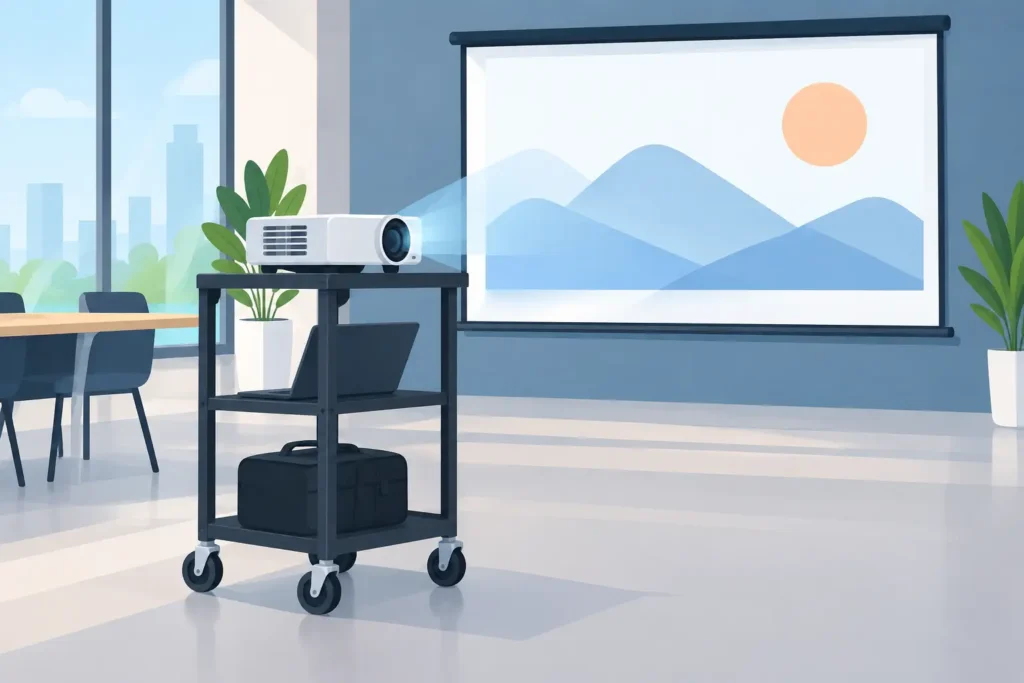
A projector does not have to be fixed to one ceiling mount or one meeting room. Projector trolleys give schools, offices, training centers, and event teams a practical way to move a complete visual-display setup wherever it is needed. Roll it into a classroom for a lesson, position it in a boardroom for a client presentation, or bring it to a multipurpose hall for a workshop.
The trolley may look like a simple accessory, but it has a direct effect on image stability, cable safety, setup time, and the life of the projector itself. The right model turns a projector, screen, laptop, wireless dongle, and sound system into a ready-to-use mobile presentation station. The wrong one can create wobble, blocked ventilation, awkward viewing angles, and a frustrating setup every time the equipment moves.
Why Projector Trolleys Matter in Shared Spaces
Permanent installation is ideal when a projector always serves the same room. A ceiling-mounted laser projector, for example, is an excellent choice for a dedicated meeting room or home theater. But many organizations work with shared rooms, changing schedules, and limited budgets. One high-quality Full HD or XGA projector may need to support several locations during the week.
A projector trolley makes that investment work harder. Instead of carrying the projector by hand, searching for an available table, and running cables across the floor, staff can move an organized setup from one room to another. This is particularly useful for school teachers rotating between classrooms, office administrators supporting different meeting rooms, and training teams running sessions at client sites.
Mobility also gives teams more freedom to choose the best projection position. If sunlight is affecting the image, the trolley can be moved away from windows. If a short-throw projector needs to sit close to the screen to avoid shadows, the cart can be positioned precisely. For portable projectors used at events, it provides a more professional alternative to placing equipment on a chair or unstable table.
Start With the Room, Not Just the Projector
The best trolley depends on where and how it will be used. Before comparing shelves, wheels, and weight capacities, look at the room layout. Measure the path from storage to the presentation area, including doorways, elevators, ramps, and tight turns. A large AV cart may hold more equipment, but it is not helpful if it cannot enter the rooms where it is needed.
Think about the screen position too. A standard-throw projector needs more distance from the screen than a short-throw model. If the trolley will be used in several rooms, confirm that each room has enough depth to achieve the desired image size. Projector placement is not just about getting an image on the wall. The image should be bright enough, properly focused, level, and free from people walking through the beam.
For classrooms and offices with ambient light, a projector with sufficient ANSI lumens is usually more practical than relying on a trolley alone. The cart gives you placement flexibility, while brightness determines how well charts, text, and video remain visible. These choices work together.
Choose the Right Top Shelf
The upper shelf is where stability matters most. It should be wide enough to support the projector without overhang and strong enough to handle its weight with a safe margin. Check the actual projector dimensions, including rear cables and side ventilation areas. A compact smart projector may fit on many shelves, while a larger laser model or professional installation projector needs a more generous platform.
Avoid placing a projector tightly against a back panel, wall, or stack of accessories. Projectors draw in air and exhaust heat through dedicated vents. When ventilation is blocked, internal temperatures can rise, fan noise may increase, and component life can be reduced. Leave clear space around the intake and exhaust vents according to the projector manufacturer’s guidance.
A raised edge on the shelf can help prevent equipment from sliding when the cart moves. However, the edge should not interfere with cables or block airflow. A flat, non-slip surface is often the most practical option for smaller portable models.
Look Below the Projector
The lower shelves are where a trolley becomes a complete presentation solution. A laptop, HDMI cable, wireless display dongle, power strip, remote control, document camera, and small speaker can be kept together rather than collected from different cupboards before every session.
For education environments, a lower shelf can hold a visualizer or teaching materials. In corporate settings, it may carry a mini PC or wireless presentation device for guests. Event teams may use the space for an audio receiver or media player. The goal is not to overload the cart. It is to keep the equipment that is genuinely needed for each presentation protected and within reach.
Cable management deserves attention here. Loose HDMI, power, and audio cables can snag on door frames or wheels. Use cable channels, ties, or clips to keep cables routed neatly along the trolley frame. Leave enough slack for adjustments, but do not allow cables to trail across walking paths. A clean cart looks more professional and helps reduce trip hazards.
Stability Is More Valuable Than Extra Shelves
A tall trolley with many shelves may seem like better value, but stability should come first. A low center of gravity, solid frame, and well-designed wheelbase matter more than adding equipment to every level. This is especially true when moving a projector through busy classrooms, corridors, or event venues.
Locking casters are essential. Once the trolley is in position, the wheels should lock firmly so that the image does not shift when someone adjusts the projector, connects a laptop, or presses a button. If the cart has four casters, confirm that the locking mechanism is easy to reach and reliable on the flooring where it will be used.
Wheel material also affects daily use. Hard wheels may move easily on smooth tile but can create more noise and vibration. Larger rubberized wheels are often better for uneven surfaces, carpet transitions, and longer distances. There is no single best choice. A trolley used only on level office flooring has different needs from one moved across a school campus or event hall.
If your projector supports keystone correction, that feature can help refine an image after small placement changes. Still, physical alignment is preferable. Excessive digital keystone adjustment can reduce usable image detail, so a stable cart that lets you position the projector at the correct height is a better starting point.
Set the Correct Viewing Height
A trolley should place the lens at a height that works with the screen, not simply at desk level. If the projector sits too low, the image may require heavy keystone correction. If it sits too high, the beam can pass directly through standing presenters or create an uncomfortable viewing angle.
For standard projectors, start by checking lens offset and throw specifications. Many models project the image slightly above the lens centerline when placed upright. Short-throw models can behave differently, and ultra-short-throw projectors are usually better suited to dedicated furniture or wall-mounted installations because small movements can noticeably affect image geometry.
Adjustable shelf height is helpful for organizations using different projector types. It is also useful when the same trolley supports both seated boardroom presentations and standing training sessions. Just make sure adjustment points lock securely and do not introduce wobble.
Security and Storage Need a Realistic Plan
A mobile cart is easy to relocate, which also means equipment can be easier to misplace. If the trolley will remain in shared areas, consider a lockable cabinet, a security cable point, or a storage room when it is not in use. Keep remotes, adapters, and specialty cables in a labeled compartment. These small items are often the first pieces to disappear from a shared AV setup.
For schools and organizations with multiple users, a simple setup label can save time. List the correct HDMI input, Wi-Fi display method, remote-control location, and shutdown steps. This reduces avoidable support calls and helps ensure the projector cools down correctly after use.
When a Trolley Is the Better Choice
Projector trolleys are an excellent fit when flexibility is more valuable than permanent installation. They work well for rotating classrooms, training rooms, temporary meeting spaces, exhibitions, community halls, and multipurpose venues. They are also useful during renovation work, when a permanent display area is not yet ready.
A ceiling mount may still be the better option for rooms with daily projector use, fixed seating, and a consistent screen location. Permanent installation offers cleaner cable routing and prevents accidental movement. The practical decision comes down to how often the setup changes and how many spaces one projector must support.
When choosing a trolley, prioritize a stable top shelf, locking wheels, proper ventilation clearance, useful storage, and a footprint that fits your building. Match it with the right projector brightness, resolution, throw ratio, and connectivity, and a mobile AV cart becomes more than a piece of furniture. It becomes a dependable display station that is ready whenever the next class, meeting, or presentation begins.