

TL;DR:
- Wireless projector adapters convert HDMI or USB ports into wireless display receivers, enabling quick setup.
- Dual-band (5GHz) adapters offer better performance in Malaysia's crowded urban Wi-Fi environments.
- They are ideal for portability and presentations but less suitable for high-lag home theater or gaming setups.
Most people assume going wireless with a projector means buying a brand-new smart projector or hiring someone to configure a complicated network. That assumption is wrong. A wireless projector adapter plugs into your projector's HDMI or USB port and gets you casting content from a phone, laptop, or tablet in under five minutes. Whether you run a classroom in Kuala Lumpur, present in a boardroom in Penang, or stream movies at home in Johor Bahru, the right adapter changes everything. This guide walks you through how adapters work, which models suit Malaysian users best, what performance to expect, and how to avoid the most common mistakes.
Table of Contents
- What are wireless projector adapters and how do they work?
- Popular adapter types and top models available in Malaysia
- Performance, latency, and reliability: What to expect
- Expert tips: Avoiding pitfalls and getting the best experience
- Our take: When (and when not) to go wireless for your projector
- Find your wireless adapter and projector essentials in Malaysia
- Frequently asked questions
Key Takeaways
| Point | Details |
|---|---|
| Quick and Easy Setup | Most wireless adapters install in minutes using USB or HDMI ports, with basic menu navigation. |
| Match Adapter to Use Case | Choose Miracast or certified options for business and education and multi-protocol dongles for broader home use. |
| Performance Varies by Model | Latency and reliability depend on adapter type, network setup, and brand certification. |
| Avoid Common Pitfalls | Check compatibility and HDCP support to avoid streaming or connectivity issues. |
What are wireless projector adapters and how do they work?
A wireless projector adapter is a small device that adds wireless display capability to any projector with an HDMI or USB port. Think of it as a translator. Your phone or laptop speaks Wi-Fi, and your projector only speaks HDMI. The adapter bridges that gap instantly.
Most adapters rely on one of two core mechanisms. The first is screen mirroring, where your device broadcasts its display signal over Wi-Fi and the adapter receives it. The second is network streaming, where both your source device and the adapter connect to the same Wi-Fi router. Setup typically involves plugging in and selecting the right input on your projector's menu, nothing more.
Here is what you will find inside most wireless projector adapters:
- HDMI or USB connector to plug into the projector
- Wi-Fi radio supporting 2.4GHz, 5GHz, or both (dual band)
- Processor chip to decode and re-encode the video signal
- Power input via USB or micro-USB cable
The supported Wi-Fi standards matter more than most buyers realize. Older 2.4GHz-only adapters struggle in Malaysian city apartments packed with competing networks. Dual-band adapters that support 5GHz deliver noticeably smoother video.
For wireless projector connection tips that go beyond the basics, it helps to understand which port your projector uses before you buy anything.
"The best adapter is the one that matches your projector's port and your network's frequency band, not the cheapest one on the shelf."
Who benefits most from wireless adapters? Teachers who move between classrooms, sales teams presenting from multiple laptops, and homeowners who want a clean living room setup without cable clutter. You can also pair adapters with projector accessories like mounts and screens to build a complete cable-free system.
Pro Tip: Before purchasing any adapter, physically check whether your projector has an HDMI port or only USB. Some budget projectors only support USB-A, which limits your adapter choices significantly.
With the basics out of the way, let's look at the main types and how they compare.
Popular adapter types and top models available in Malaysia
Four main adapter categories dominate the Malaysian market, each with different strengths.
Miracast adapters use a direct device-to-device Wi-Fi connection (called Wi-Fi Direct) without needing a router. AirPlay adapters work best for Apple device users. Standard Wi-Fi adapters connect through your existing router for multi-user sharing. Wireless HDMI transmitters send a full HDMI signal over radio frequency for the lowest possible latency.
Popular models in Malaysia include the Epson ELPAP10, EZCast, Microsoft Wireless Display Adapter, and Google TV Streamer. Each targets a slightly different user.
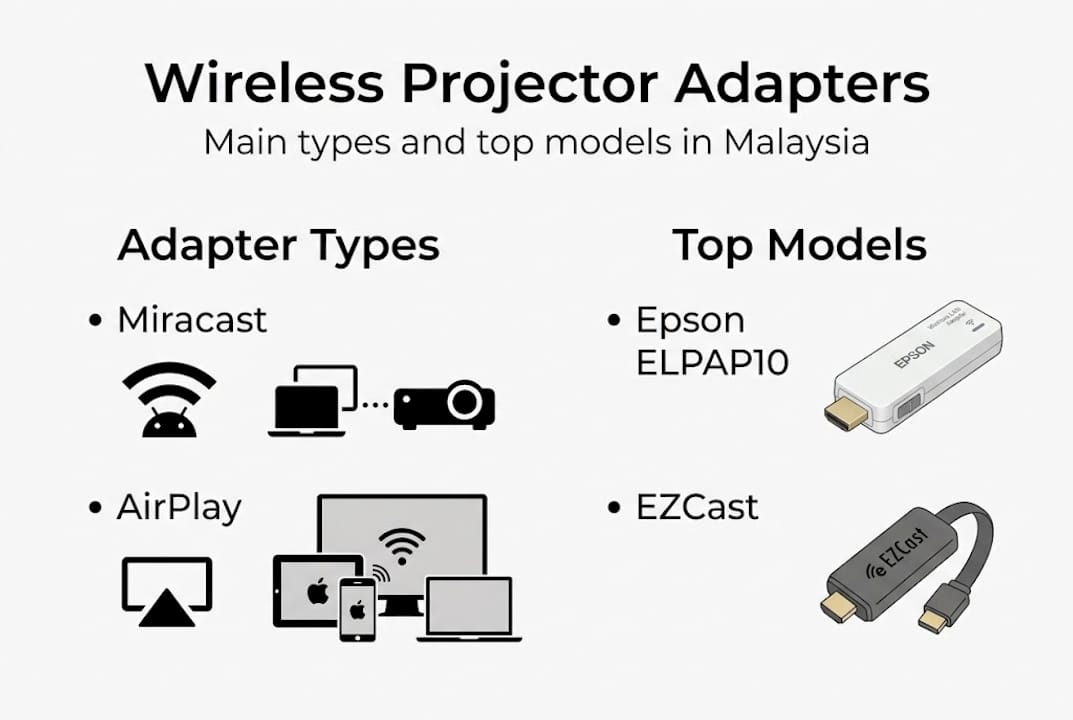
| Model | Protocol | Price range (MYR) | Best for | Limitation |
|---|---|---|---|---|
| Epson ELPAP10 | Proprietary Wi-Fi | RM 350-500 | Epson projector users | Epson-only compatibility |
| EZCast Pro | Miracast/AirPlay/DLNA | RM 150-280 | Mixed device environments | Needs app for full features |
| Microsoft Wireless Display Adapter | Miracast | RM 200-320 | Windows laptops and Android | No Apple AirPlay support |
| Google TV Streamer | Google Cast/AirPlay | RM 250-400 | Home streaming, Android TV | Requires power outlet nearby |
Latency is the number that separates casual and professional use. Direct peer-to-peer connections like Miracast deliver latency as low as 10-30ms, while standard Wi-Fi adapters typically sit between 30-100ms. For presentations and classroom use, that range is perfectly acceptable.
Key buying factors to compare:
- Protocol compatibility with your devices (Windows, Android, iOS, macOS)
- 5GHz band support for dense urban environments
- HDCP certification for streaming protected content
- Powered via projector USB or separate adapter
You can browse current deals on adapters to compare pricing, or check Aihome for local Malaysian stock availability. For users choosing between adapter types and portable projectors, the portable projector comparison guide helps clarify which setup makes more sense for your situation.
Knowing what models to look for, it's essential to understand their real-world performance and limitations.
Performance, latency, and reliability: What to expect
Buying an adapter is straightforward. Understanding what it will actually do in your specific environment is where most people get surprised.
| Adapter type | Typical latency | Best environment | Reliability rating |
|---|---|---|---|
| Wireless HDMI transmitter | 1-10ms | Dedicated AV room | Very high |
| Miracast direct P2P | 10-30ms | Office, classroom | High |
| Wi-Fi router-based adapter | 30-100ms | Home, multi-user | Moderate |
| Budget 2.4GHz dongle | 80-200ms | Low-traffic areas only | Low |
Direct P2P and Miracast adapters offer 10-30ms latency, while Wi-Fi 6 further reduces lag in congested network environments. Wi-Fi 6 support is increasingly relevant in Malaysian cities where dozens of networks compete on the same frequencies.
Three factors most commonly degrade reliability in Malaysian homes and offices:
- Network congestion: High-rise apartments in KL or Penang often have 20 or more competing Wi-Fi networks on 2.4GHz
- Device heat: Adapters running for extended periods in warm Malaysian climates can throttle performance
- Physical interference: Walls, metal surfaces, and microwave ovens all disrupt 2.4GHz signals
For educators, the priority is connection stability. A dropped signal mid-lesson wastes class time and breaks student focus. Miracast direct P2P mode eliminates the router variable entirely, making it the most reliable classroom choice.
For business presentations, a stable connection during a client meeting is non-negotiable. A dual-band adapter on 5GHz, connected to a dedicated meeting room router, is the safest configuration.
For home theater, prioritize adapters with 5GHz dual-band support. Streaming 1080p video over 2.4GHz in a busy apartment building produces stuttering and dropped frames. Explore projector connectivity setups for room-specific recommendations, and compare Wi-Fi vs HDMI for projectors if you are still deciding between the two approaches.
Pro Tip: If you use your projector for gaming or live video calls, a wired HDMI connection still outperforms every wireless adapter available today. Save the adapter for presentations and casual streaming.
Now, let's address some advanced buying and troubleshooting advice for the best results.
Expert tips: Avoiding pitfalls and getting the best experience
Most wireless adapter problems are preventable. They come down to compatibility mismatches, wrong network settings, or buying an uncertified product. Here is how to avoid them.
- Check your projector's port type first. HDMI adapters will not fit USB-A ports. Confirm before you order.
- Verify power supply method. Some adapters draw power from the projector's USB port. Others need a separate USB charger. Confirm your projector has a powered USB-A port if you want a single-cable setup.
- Choose 5GHz Wi-Fi support. In Malaysian city environments, 2.4GHz is almost always overcrowded. A 5GHz-capable adapter is worth the extra cost.
- Check for HDCP certification. If you plan to stream Netflix, Disney+, or other protected content, your adapter must support HDCP (High-bandwidth Digital Content Protection). Uncertified dongles will show a black screen or error message.
- Decide between router mode and direct P2P. For shared office or classroom setups with multiple users connecting, router-based infrastructure mode is easier to manage. For the lowest possible lag with a single device, direct P2P mode wins.
Edge cases like HDCP-protected content, signal interference, and device heat are best handled with certified adapters from recognized brands. Cheap, unbranded dongles from online marketplaces often fail HDCP checks and overheat within 30 minutes of use.
"Wireless can be unstable in complex environments. In those cases, a certified adapter on 5GHz is the minimum standard, and a wired HDMI connection remains the benchmark for reliability."
For wireless connection troubleshooting when things go wrong, the most common fix is simply switching from 2.4GHz to 5GHz in the adapter's settings. The second most common fix is moving the source device closer to the adapter during initial pairing.
If you order online, confirm delivery options for adapters to your area, especially for East Malaysia where shipping timelines differ from Peninsular Malaysia.
Pro Tip: Always verify that your chosen adapter explicitly lists 5GHz support on its packaging or product page. Many budget models advertise "dual band" but only use 5GHz for setup, not for actual video streaming.
Having covered best practices, let's examine a nuanced expert perspective on when wireless adapters truly make sense.
Our take: When (and when not) to go wireless for your projector
Wireless adapters get oversold as a universal upgrade. They are not. They are the right tool for specific situations, and knowing the difference saves you money and frustration.
Wireless genuinely wins for portability, shared devices, and meeting rooms where multiple people need to present without swapping cables. Teachers who wheel a projector between rooms benefit enormously. Sales teams presenting from different laptops in the same room benefit even more.
But serious home theater users and gamers who demand zero lag should reach for an HDMI cable first. No adapter, regardless of price, matches the reliability and latency of a direct wired connection. The physics simply do not allow it.
Malaysia's urban density adds another layer. High-rise living in KL, Petaling Jaya, or Penang means Wi-Fi congestion is a real obstacle. In those environments, Wi-Fi 6 adapters on 5GHz with certified HDCP support are the minimum standard worth buying. Anything below that is a compromise you will feel.
The portable projector buying advice on our site helps you decide whether a wireless adapter or a built-in smart projector is the smarter long-term investment for your setup.
"Convenience wins for meetings. Cables are still king for critical, lag-free performance."
Choose based on your environment and actual use case, not just the appeal of going cable-free.
Find your wireless adapter and projector essentials in Malaysia
Ready to cut the cables? ProjectorDisplay.com stocks a curated selection of wireless adapters, projectors, and screens built for Malaysian homes, classrooms, and boardrooms.

Browse current deals on adapters to find certified models that match your projector's port and your network setup. If you want step-by-step guidance before buying, the how to connect projectors wirelessly guide walks you through every configuration. From portable projectors to laser models and full screen setups, Malaysia's leading projector store has everything you need to build a clean, cable-free display system with confidence.
Frequently asked questions
Do I need technical skills to set up a wireless projector adapter?
No. Most adapters plug into HDMI or USB and require only basic menu selection, with the entire setup taking 3-5 minutes for most users.
Can I stream Netflix or copyrighted content with wireless adapters?
Only adapters with HDCP certification can handle protected content like Netflix or Disney+. Uncertified budget dongles will typically show a black screen or error.
How much lag will I notice with a wireless adapter for presentations?
With certified Miracast or direct P2P adapters, latency runs 10-30ms, which is unnoticeable during slide presentations and suitable for most classroom or business use.
Where can I buy trusted wireless projector adapters in Malaysia?
Reputable options are available at local sites like Aihome and projectordisplay.com, both of which carry certified models suited to Malaysian network environments.
Recommended
- Projector Wireless Connection: Enhancing Presentations – Projector Display
- Step-by-step guide to wireless projector connectivity – Projector Display
- How to Connect Projector: Step-by-Step Guide for Malaysia 2025 – Projector Display
- How to Connect Projector: Step-by-Step Guide for Malaysia 2025 – Projector Display